
Table of Contents
You’ve probably had this happen. You find an image online, but you have no idea where it came from, what the object in it is, or whether someone has simply reposted it somewhere else. A normal keyword search isn’t always enough.
That’s where image search techniques become useful. With tools such as Google Lens, Google Images, TinEye, and Bing Visual Search, you can search using an image instead of relying only on words. You can find similar images, identify products and objects, trace where a picture has appeared, and sometimes uncover an older or higher-resolution version.
This guide breaks down the main image search methods, shows when to use reverse image search versus visual search, explains how the technology works behind the scenes, and covers practical techniques for getting better results. You’ll also learn how to trace an image’s source, search from screenshots and mobile photos, compare search tools, and avoid common mistakes.
What Are Image Search Techniques?
Image search techniques are methods used to find, identify, compare, or retrieve images from the web or an image database. Instead of relying only on a text query, these methods can use an image itself, visual characteristics, metadata, tags, or a combination of image and text.
Traditional search usually starts with a keyword search. You type something such as “red running shoes” and the search engine retrieves pages or images associated with those words.
Image search can work differently.
You might upload a photograph of the shoes and ask the system to find visually similar products. That’s visual search or image-to-image search. You might upload an old photograph to discover where it has appeared online. That’s reverse image search.
Common image search methods include:
- Text-based image search
- Reverse image search
- Visual similarity search
- Content-based image retrieval
- Object recognition search
- Facial recognition search
- Color-based search
- Shape and texture-based search
- Metadata-based search
- Semantic image search
- Multimodal search
The right method depends on what you’re trying to find.
Image Search Methods Comparison
| Image Search Method | How It Works | Best For | Requires an Image? | Main Strength |
| Keyword-based image search | Uses text queries and contextual signals | Finding images from descriptions | No | Simple and flexible |
| Reverse image search | Uses an existing image as the query | Finding sources, copies and related images | Yes | Source discovery |
| Visual similarity search | Compares visual characteristics | Finding similar pictures | Yes | Visual matching |
| Content-based image retrieval | Matches visual features such as color, texture, and shape | Large image databases | Usually | Feature-based retrieval |
| Object recognition | Identifies objects inside an image | Products, plants, animals and objects | Yes | Object identification |
| Facial recognition | Compares facial characteristics | Face matching | Yes | Face identification |
| Semantic image search | Understands image concepts and meaning | Concept-based discovery | Usually | Better contextual understanding |
| Multimodal search | Combines image and text | Complex visual queries | Usually | Combines visual + language intent |
How Does Image Search Work?
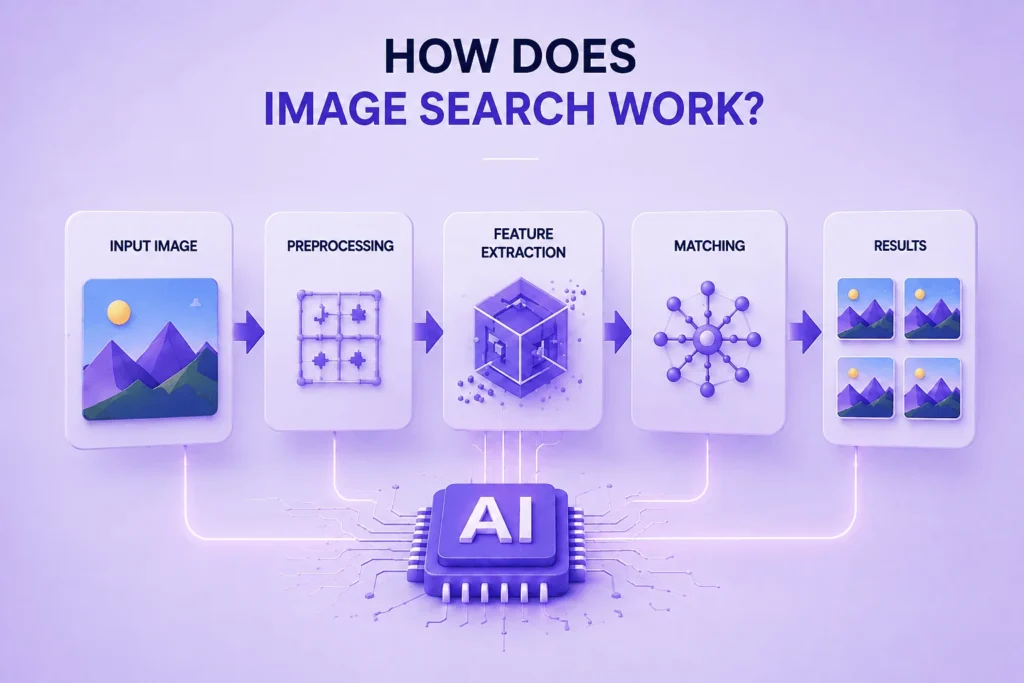
Understanding how does image search work requires looking at what happens between your query and the results.
When you perform a search, the system generally processes your query, retrieves relevant information from an image database, ranks potential matches, and displays the results.
For a traditional text search, this might involve keywords, page content, links, and other signals. For modern visual search, the system can also analyze pixels, objects, shapes, colors, textures, faces, and higher-level visual concepts.
A simplified computer vision pipeline looks like this:
Image → preprocessing → feature extraction → image indexing → similarity matching → ranking → results
Large datasets such as ImageNet and COCO have helped advance image recognition and computer vision research.
Companies such as Google, Microsoft, Amazon, and Pinterest have incorporated computer vision into different visual products and services.
- Image Preprocessing
The system may resize, normalize, crop, or otherwise prepare a query image before analyzing it.
This preprocessing step helps reduce irrelevant variations caused by resolution, lighting, compression, or image dimensions.
- Feature Extraction
Next, an image recognition system can identify useful visual characteristics.
Older systems relied heavily on manually designed feature descriptors such as SIFT, SURF, and ORB. These approaches can capture information about edges, shapes, textures, and local features.
Modern systems increasingly use deep learning.
- Convolutional Neural Networks
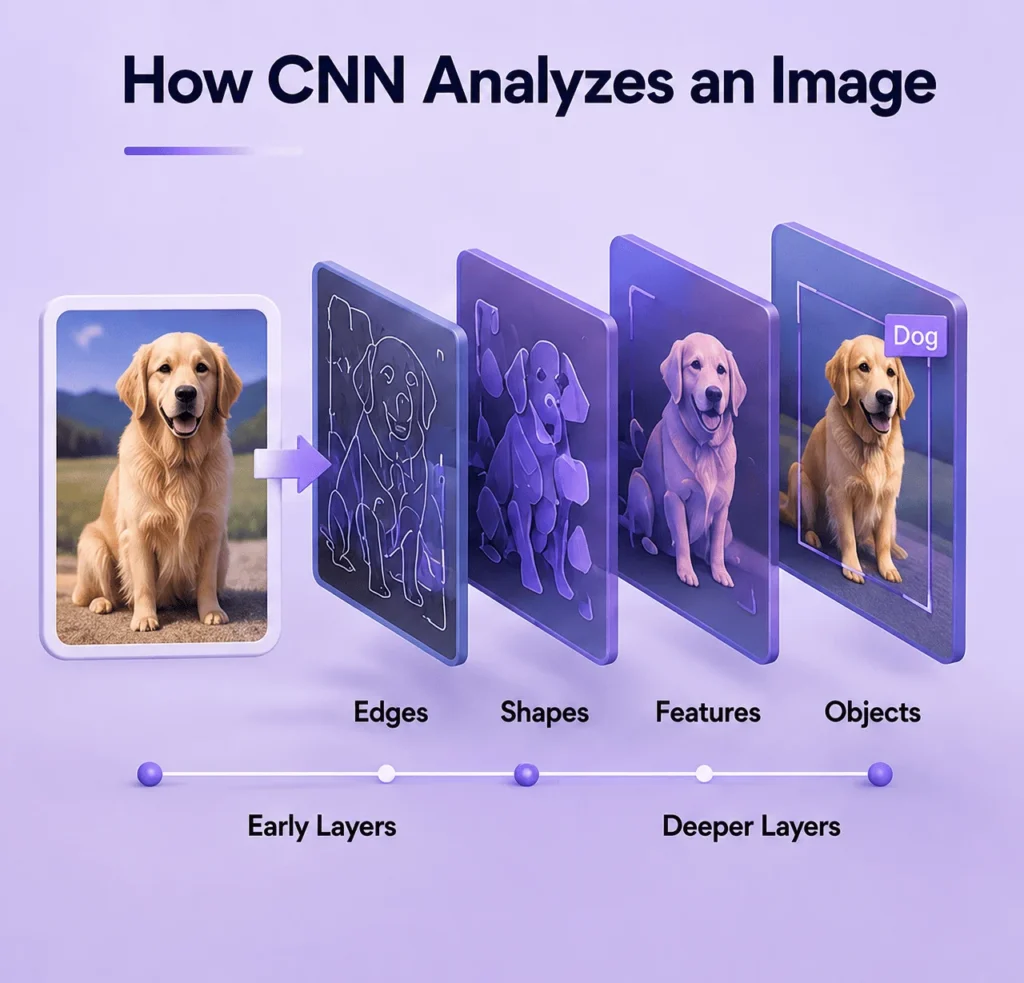
A convolutional neural network (CNN) can learn visual patterns from large collections of images. A widely used architecture in production image-retrieval systems is ResNet-50, which extracts a compact feature vector from each image rather than comparing raw pixels directly.
Research from people such as Fei-Fei Li, Yann LeCun, and Geoffrey Hinton has played an important role in the development of modern computer vision and deep learning.
Frameworks such as TensorFlow and libraries such as OpenCV have also made image analysis and computer vision development more accessible.
How a CNN Analyzes an Image: Simple Example
Imagine you upload a photograph of a red running shoe to an image search system.
- Input image: The CNN receives the photograph as numerical pixel data.
- Early layers: The network detects basic visual patterns such as edges, lines, shapes, and changes in color.
- Middle layers: The network combines these simpler patterns to recognize meaningful features, such as the sole, laces, or overall shape of the shoe.
- Deeper layers: The network learns higher-level visual patterns that help distinguish a running shoe from other objects.
- Feature representation: The learned visual information can be converted into a compact representation for comparison.
- Similarity search: The retrieval system compares this representation with representations stored in its index and retrieves visually related images or products.
This is why modern image search doesn’t need to compare every pixel of two images directly. Instead, it can compare learned visual representations to find images that are similar in appearance or meaning
- Image Embeddings
Modern systems can convert images into numerical representations called embeddings.
Instead of simply asking whether two files are identical, an image retrieval system can compare their representations to determine whether they are visually or semantically related.
This makes visual similarity possible.
- Similarity Matching
A search engine then compares the query representation against indexed images.
Techniques such as nearest-neighbor search, hashing, and approximate nearest neighbor search can help retrieve relevant results from very large collections.
- Image Ranking
Finally, a ranking function determines which results should appear first based on relevance and other signals.
This entire process is part of modern image retrieval systems and techniques.
What Are the Main Image Search Methods and Techniques?
There isn’t one universal way to search an image. Different image search methods and techniques solve different problems.
- Keyword-Based Image Search
Keyword-based search is the most familiar approach.
You enter words describing what you want, and an image search engine retrieves images associated with those terms.
For example:
“black leather boots”
The system may use the page title, surrounding text, image filename, alt text, captions, metadata, structured data, and other signals to determine relevance.
This remains useful when you know what you’re looking for but don’t have an example image.
- Reverse Image Search
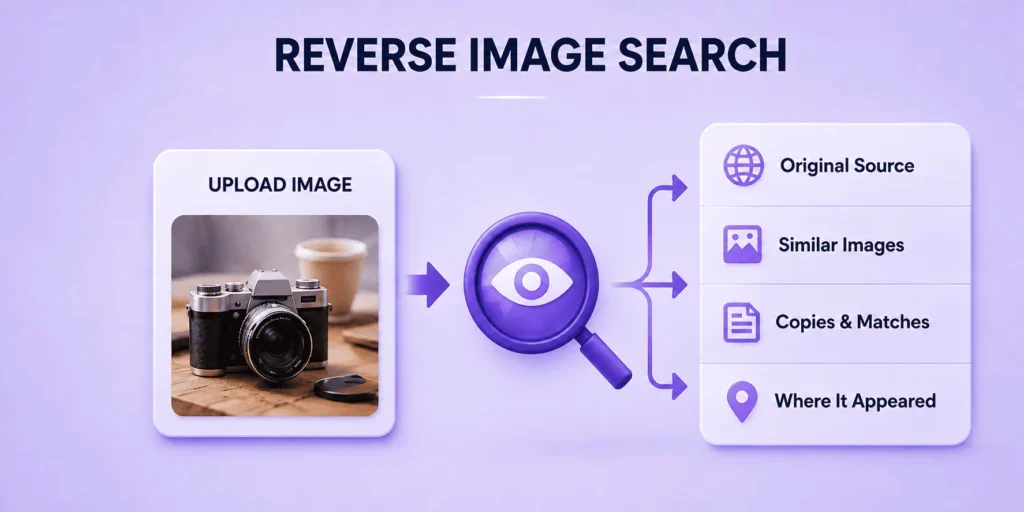
Reverse image search lets you start with an existing image rather than a text query.
Instead of asking:
“What does this look like?”
you provide the image and ask the search engine to find matching or related information.
This can help you:
- Find the original source
- Discover duplicate images
- Find visually similar images
- Identify products
- Research photographs
- Check where an image has appeared
- Find higher-resolution versions
- Investigate potentially misleading images
Reverse image search techniques are particularly useful when you don’t know the correct keywords to describe an image.
- Visual Similarity Search
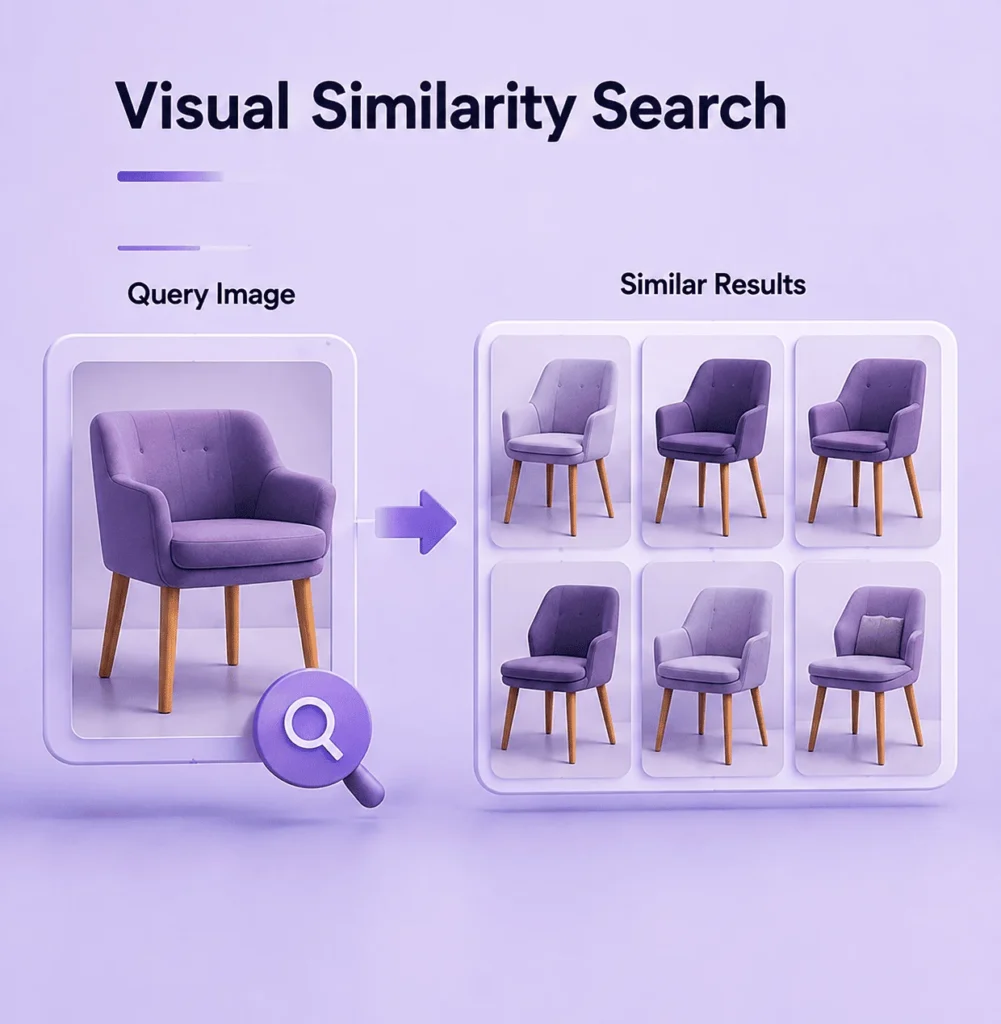
Visual search focuses on what an image looks like.
A visual search engine can analyze characteristics such as:
- Color
- Shape
- Texture
- Objects
- Patterns
- Composition
- Visual features
You can use this approach to find similar images or find similar pictures without knowing their exact names.
For example, uploading a photograph of a chair may produce visually similar chairs, furniture, or products.
- Content-Based Image Retrieval
Content-based image retrieval (CBIR) retrieves images according to their visual content rather than relying entirely on manually assigned keywords.
A CBIR system may analyze:
- Color histograms
- Texture
- Shape
- Edges
- Local features
- Feature descriptors
- Deep visual embeddings
This is particularly useful when text descriptions are incomplete or unavailable.
Content-based image retrieval methods are widely relevant to computer vision, digital libraries, eCommerce, research, and multimedia information retrieval.
- Object Detection Search
Object-based search attempts to identify specific objects within an image.
For example, a photo might contain:
- A laptop
- A coffee cup
- A bicycle
- A car
- A plant
Modern image identification techniques can identify multiple objects rather than treating the entire photograph as one visual unit.
- Facial Recognition Search
Facial recognition can compare facial features to identify or match faces.
However, facial search raises significant privacy and ethical considerations. Results can also be inaccurate, especially when images are low-quality, heavily edited, or captured from unusual angles.
For that reason, image search for face recognition should be approached carefully and responsibly.
- Color-Based Image Search
A color histogram or similar representation can help retrieve images according to dominant colors.
For example, you might search for images dominated by:
- Blue
- Black
- White
- Green
- Orange
Color-based search can be useful for design inspiration, photography, fashion, and visual merchandising.
- Texture and Shape-Based Search
Texture-based and shape-based search methods analyze visual properties that may remain useful even when exact image matching isn’t possible.
These visual search techniques can help distinguish objects, materials, patterns, and designs.
They’re especially useful in specialized image databases.
- Metadata-Based Search
Not every image search technique depends on visual information.
Images can contain or be associated with metadata, including:
- File information
- Camera information
- Date
- Location
- Keywords
- Descriptions
Search engines may also use page-level information surrounding an image.
Metadata can help, but it shouldn’t be treated as proof that an image is authentic or accurately described.
- Semantic Image Search
Semantic search attempts to understand the meaning or concept represented by an image.
For example, an image showing a golden retriever on a beach may be associated with concepts such as:
dog, golden retriever, beach, ocean, animal, outdoors
- Pattern-Based Search
Pattern-based image search looks for recurring visual structures within an image rather than matching the entire image as one object. The system can focus on repeated shapes, lines, textures, or arrangements that make a pattern distinctive.
For example, a search can use patterns such as:
- Stripes and checks
- Geometric shapes
- Floral or decorative motifs
- Fabric and textile patterns
- Repeating architectural designs
- Wallpaper or flooring patterns
This can be useful when you’re trying to find a design that looks similar but isn’t an exact copy. A photograph of a patterned shirt, for example, may be used to find similar textile designs even when the model, background, lighting, and colors are different.
- Context-Based Search
Context-based image search uses information surrounding an image, such as the webpage, caption, headings, and related text, to understand what the image represents.
For example, a photo of two people shaking hands may be interpreted differently when it appears on a page about a company merger. This helps search systems return more relevant results when an image is visually generic or ambiguous.
- Multimodal Image Search
Modern search systems increasingly combine images with text. Google Multisearch is an example of this approach, allowing users to combine an image with a text query to refine their search.
For example, you might upload a picture of a jacket and add:
“Find something similar in black under $100.”
This combines visual information with a natural-language search query, making it easier to search using both what something looks like and what you want to know about it.
Multimodal retrieval is an important direction for modern visual search technology.
Image Search vs Reverse Image Search vs Visual Search
| Feature | Image Search | Reverse Image Search | Visual Search |
| Starting point | Text, image or filters | Existing image | Image or visual input |
| Main purpose | Discover relevant images | Find matching or related occurrences | Identify and understand visual content |
| Find exact copies | Sometimes | Strong | Sometimes |
| Find similar images | Yes | Yes | Strong |
| Identify objects | Limited | Sometimes | Strong |
| Find products | Yes | Yes | Strong |
| Find original sources | Limited | Strong | Limited |
| Use natural-language queries | Yes | Sometimes | Yes |
| Best for | General discovery | Source tracing and verification | Identification and discovery |
Knowing the difference helps you choose the right image search options instead of using the same technique for every problem.
How to Search by Image
There are several ways to search by image.
Search Using an Uploaded Image
The easiest approach is to upload an image to a visual search service. Depending on the platform, you may be able to select an image file from your device, drag and drop the image file into the search interface, or paste an image URL.
This works well when you have:
- A photograph
- Screenshot
- Product image
- Artwork
- Logo
- Plant
- Landmark
- Unknown object
Search Using an Image URL
If an image already exists online, some services allow you to search using its URL rather than downloading it first.
This can be useful when researching an image from a webpage.
Search Using a Picture From Your Phone
Mobile visual search makes searching using an image particularly convenient.
You can photograph an object and immediately use a compatible visual search service to identify or investigate it.
This is useful for:
- Products
- Plants
- Animals
- Landmarks
- Clothing
- Artwork
Search From a Screenshot
A screenshot can also work as a starting point for reverse image search.
However, screenshots may contain:
- UI elements
- Text
- Borders
- Cropping
- Compression
For better results, crop the screenshot so that the important visual content is the main focus.
Best Reverse Image Search Tools
Different reverse image search tools are designed for different purposes.
Google Images and Google Lens
Google Images is one of the most widely used image search services, while Google Lens provides powerful visual recognition and search capabilities.
You can use them for:
- Similar image discovery
- Object identification
- Product discovery
- Landmark identification
- Text extraction
- Visual research
For many users, Google provides the best starting point for how to reverse image search on Google.
TinEye

TinEye specializes in reverse image search and is particularly useful when you’re trying to locate copies or modified versions of an image.
It can be valuable for photographers, publishers, and businesses monitoring where their images appear online.
Bing Visual Search
Bing Visual Search from Microsoft supports visual queries and can help identify objects, products, and visually related content.
It’s useful as a second search engine when Google doesn’t return enough information.
Yandex Images

Yandex Images is another option for visual and reverse-image searching.
Different search engines maintain different indexes, so using Yandex Images alongside Google and Bing can sometimes reveal additional results.
Pinterest Lens
Pinterest Lens is particularly useful for visual discovery, inspiration, fashion, home design, and related products.
It’s a good example of how visual search engines can move beyond traditional information retrieval toward discovery.
Image Search Tools Comparison
| Image Search Tool | Best For | Reverse Image Search | Visual Search | Object Identification | Similar Images | Product Search | Strengths | Weaknesses |
| Google Lens / Google Images | General visual search | Yes | Yes | Yes | Yes | Yes | Broad visual understanding, object recognition, products | Results can vary by query and image |
| TinEye | Finding image copies | Yes | Limited | No | Yes | No | Strong for tracking copies and modified versions | Less useful for object identification and product discovery |
| Bing Visual Search | Visual and product search | Yes | Yes | Yes | Yes | Yes | Good combination of visual matching and product discovery | Results may differ from Google |
| Yandex Images | Visual matching | Yes | Yes | Yes | Yes | Limited | Useful for cross-checking reverse-image results | Coverage and results vary by region |
| Pinterest Lens | Fashion and design discovery | Limited | Yes | Yes | Yes | Yes | Strong for inspiration, fashion, and related products | Less suited to source verification |
How to Choose the Best Image Search Tools
The best image search tools depend on what you’re trying to accomplish.
| Goal | Useful starting point |
| General image discovery | Google Images |
| Visual object identification | Google Lens |
| Finding image copies | TinEye |
| Cross-checking visual results | Bing Visual Search |
| Additional visual results | Yandex Images |
| Fashion and design inspiration | Pinterest Lens |
| Licensed stock imagery | Stock image platforms |
| Research | Multiple image search engines |
No single service has a complete index of the entire web.
That’s why one of the best reverse image search methods is to compare results across multiple platforms.
How to Find Similar Images
If your goal is to find similar images, don’t necessarily search for the exact filename or title.
Start with the clearest version of the image you have.
Then:
- Upload the image.
- Crop unnecessary areas.
- Search the most distinctive part.
- Try more than one visual search engine.
- Add descriptive keywords if supported.
- Compare visual and semantic matches.
This image matching approach can work particularly well for products, fashion, artwork, interior design, and photography.
Advanced Image Search Techniques
Basic searching is only the beginning. Several advanced image search techniques can make results more precise.
Search With Specific Keywords
Good image search keywords provide context that visual information alone may not capture.
Instead of searching for:
shoes
try:
black leather men’s Chelsea boots
Specific queries help narrow the search space.
Use Search Operators
Advanced search operators can help narrow image results by website, file type, or other criteria.
For example, site-specific searching can help you investigate images published on a particular domain.
This is useful for research, competitive analysis, and image search SEO.
Crop the Image
When a photograph contains multiple objects, searching the entire image can produce confusing results.
Crop the image to isolate:
- A product
- Face
- Logo
- Building
- Plant
- Artwork
- Clothing item
Then repeat the search.
Search Multiple Crops
One of the most effective image search tips is to search several versions of the same image.
Try:
- Full image
- Main subject
- Background
- Logo
- Distinctive object
- Text-containing area
Different crops can trigger different matches.
Why Reverse Image Search Sometimes Fails
Even the best reverse image search techniques can’t guarantee a result.
You may get poor results because:
The Image Is Low Quality
Heavy compression, blur, or pixelation can make visual matching harder.
The Image Has Been Edited
Filters, cropping, mirroring, overlays, and other changes can reduce exact matches.
The Image Has Not Been Indexed
Search engines can’t return pages they haven’t discovered or indexed.
The Image Is New
A recently published image may not yet appear in an image database.
The Source Is Private
Images behind private accounts, restricted pages, or authentication systems may not be searchable.
The Image Contains Too Many Objects
A complex photograph can make it difficult for the system to determine which visual element matters.
Different Search Engines Have Different Indexes
This is why using multiple image search tools can improve your chances of finding useful results.
How to Improve Image Search Accuracy
If you’re trying to learn how to improve image search accuracy, start with the query rather than immediately blaming the search engine.
Use the highest-quality image available.
Crop irrelevant areas.
Search distinctive objects separately.
Try several image search methods.
Add descriptive text where possible.
Use multiple search engines.
Check both exact matches and visually similar results.
Most importantly, don’t assume the first result is automatically the correct result.
How to Find the Original Source of an Image
One of the most useful reverse image search techniques is source tracing.
If you want to identify where an image originally came from:
Start With Reverse Image Search
Upload the image to Google Lens, TinEye, Bing Visual Search, or another suitable service.
Search Different Versions
Try the complete image and several crops.
Look for Older Results
A page appearing first in search results isn’t necessarily the original publisher.
Look for older dates and earlier versions.
Check Context
Read the page surrounding the image.
The original source should ideally have a credible connection to the image.
Cross-Check Results
Use more than one reverse image search tool before concluding.
This approach is especially useful for image search techniques for finding sources.
How to Use Image Search for Research
Image search can be much more than finding pictures.
Researchers, journalists, students, photographers, historians, and analysts can use it for:
- Finding sources
- Comparing historical photographs
- Identifying locations
- Finding visual references
- Tracking image reuse
- Researching artwork
- Investigating news photos
- Finding academic illustrations
- Studying visual trends
For example, image search techniques for verifying news photos can involve reverse searching a photograph, finding older appearances, comparing captions, and checking the original publisher.
For academic work, image search can also help researchers discover relevant visual material, although the licensing and citation requirements still need to be checked.
Image Search for Products and Shopping
Visual search is increasingly important for shopping.
Instead of knowing the product name, a customer can take a photograph and use it to search for similar products.
This supports:
- Product discovery
- Similar product search
- Fashion search
- Furniture discovery
- Visual merchandising
- Price comparison
- Product recommendations
For retailers, image search for shopping can turn an image into a product-discovery interface.
This is one reason visual search technology is becoming important in eCommerce.
Image Search for Plants, Animals, Landmarks and Objects

Image identification can solve problems where users don’t know the right terminology.
Image Search for Plants
Upload a plant photograph to identify possible species or find visually similar plants.
Image Search for Landmarks
A photograph of an unfamiliar building or landmark can help uncover its location or name.
Image Search for Logos
A logo can be reverse searched to find related brands, websites, or instances of reuse.
Image Search for Art
Artwork can be searched to identify artists, titles, similar works, or online references.
Image Search for Fashion
Clothing photographs can be used to find visually similar products or styles.
These examples demonstrate why image identification search is useful even when a conventional keyword query would be difficult.
Can Image Search Detect AI-Generated Images?
AI has introduced a new challenge for image search. Tools such as Gramhir.pro, an AI image generator, can create realistic pictures in seconds.
A reverse search can sometimes locate earlier copies or related versions of an AI-generated image, but a lack of search results does not prove that an image is original or AI-generated.
Modern image analysis can examine:
- Visual artifacts
- Metadata
- Provenance information
- Content credentials
- Image history
- Context
- Similar generated images
Technologies such as C2PA and content credentials are also becoming relevant to digital image provenance.
AI image detection tools have limitations, so authenticity should be assessed using multiple signals rather than a single detector.
Image Indexing and Image Retrieval
Image indexing is a critical part of large-scale search.
Search engines cannot compare every image against every query from scratch. Instead, they build indexes and representations that make retrieval faster.
An image retrieval system may involve:
Preprocessing → feature extraction → indexing algorithm → query formulation → similarity measure → retrieval → ranking
Modern systems can use:
- Inverted indexes
- Hashing techniques
- Feature descriptors
- Vector indexes
- Approximate nearest neighbor search
- Deep visual embeddings
This is the technical foundation behind many image retrieval techniques.
Image Search SEO: How Search Engines Find Your Images
Image search SEO is the process of making images easier for search engines to understand, index, and potentially display in image results.
Important elements include:
Descriptive File Names
Use meaningful filenames rather than meaningless strings.
Alt Text
Useful alt text provides a concise description of the image for accessibility and helps search engines understand its context.
Surrounding Content
The text around an image can provide additional context.
Image Quality
Images should be clear while remaining appropriately optimized for performance.
Structured Data
Relevant structured data can provide additional information when applicable.
Image Sitemaps
Large sites may use image sitemaps to help search engines discover important visual assets.
Original Visual Content
Unique, useful images can give a site opportunities that generic stock imagery may not provide.
These are important SEO image search and search engine image optimization tips for websites that want their visual content discovered.
Image Search and Copyright
Finding an image through search doesn’t automatically permit you to use it.
This is an important part of image search and copyright.
Before using an image, check:
- Copyright ownership
- License terms
- Attribution requirements
- Commercial-use restrictions
- Editorial-use limitations
- Creative Commons terms
- Stock licensing
- Public-domain status
A reverse image search can help identify where an image has appeared, but it doesn’t establish ownership by itself.
Privacy and Image Search
Image uploads can contain sensitive information.
Before using a reverse image search service, consider whether your image includes:
- Faces
- Identification documents
- Private conversations
- Home addresses
- Personal photographs
- Children’s images
- Confidential business information
Facial recognition deserves particular caution because searching for or identifying people from photographs can create privacy and ethical concerns.
When dealing with sensitive material, review the service’s privacy practices before uploading the image.
Common Image Search Mistakes
Even experienced users can make mistakes when applying image search methods and techniques.
Using Only One Search Engine
Different services have different indexes.
Uploading a Poor-Quality Screenshot
A clean original image often produces better results.
Searching the Entire Image Every Time
Try cropping the main subject.
Assuming Similarity Means Exact Match
A visually similar image isn’t necessarily the same image.
Trusting the First Result
Search ranking doesn’t automatically prove authenticity or ownership.
Ignoring Metadata
Metadata can provide useful clues, although it can also be modified.
Ignoring Copyright
Finding an image doesn’t give you usage rights.
Treating No Results as Proof
An image with no search matches isn’t necessarily original.
Image Search for Businesses and Brand Monitoring
Businesses can use image search for brand monitoring and image protection.
Possible applications include:
- Finding unauthorized copies
- Monitoring branded imagery
- Tracking product photos
- Identifying duplicate content
- Finding counterfeit product listings
- Discovering image reuse
- Monitoring visual campaigns
Organizations building their own systems can use technologies such as OpenCV, TensorFlow, and cloud computer-vision services such as Amazon Rekognition, depending on their requirements.
Real-World Case Study: Central Retail’s Visual Search for Commerce
Central Retail, a multi-format and multi-category retailer in Thailand, uses AI-powered visual search to help customers find products from images. Its implementation uses Vertex AI Search for retail to analyze images uploaded by customers and match them with relevant products in the retailer’s catalog. The results are also shared with personal shoppers who assist customers with purchases.
1. Measured Search-Time Reduction
Google Cloud reports that Central Retail reduced the time personal shoppers spent searching for items in the price, promotion, and stock categories from 32 minutes to 1–2 minutes.
That’s a reported 94% reduction in search time.
2. Measured Conversion Impact
The same Google Cloud customer case study reports a 10% uplift in conversion rate after the visual-search tool was introduced.
3. What the Data Shows
| Metric | Before | After | Reported Change |
| Search time for price/promotion/stock categories | 32 minutes | 1–2 minutes | 94% reduction |
| Conversion rate | Baseline | — | 10% uplift |
The figures above are reported results from Google Cloud’s Central Retail customer case study, not independently audited industry benchmarks.
4. Why This Matters for Commerce
The Central Retail example provides a concrete link between visual search and commerce outcomes. The deployment was not simply designed to identify objects in photographs. It connected uploaded images to a retailer’s product catalog and was used within a shopping workflow. The reported results show improvements in both product-search efficiency and conversion rate.
This makes the case relevant to eCommerce, product discovery, visual commerce, retail search, and conversion optimization.
Data source: Google Cloud’s official Central Group customer case study.
The Future of Image Search Techniques
The future of image search techniques is moving from simple image matching toward deeper visual understanding.
Search engines are increasingly able to understand:
- Objects
- Relationships
- Scenes
- Text
- Products
- Faces
- Locations
- Context
- User intent
The next generation of visual search techniques will increasingly combine images, natural language, AI reasoning, and structured information.
Instead of simply uploading a picture and asking:
“What is this?”
you may be able to ask:
“Find similar products, explain what makes them different, and show me the cheapest options.”
That’s a shift from basic image retrieval toward conversational and multimodal discovery.
Frequently Asked Questions
What Is Reverse Image Search?
Reverse image search uses an existing image as the search query to find matching, similar, or related images and information online.
How Do I Search by Image?
Upload an image to a visual search service such as Google Lens, Google Images, TinEye, or Bing Visual Search. You can also search using an image URL where supported.
How do I do a photo search?
Upload your photo to Google Lens, Google Images, TinEye, or Bing Visual Search. Cropping the image can help produce more relevant results.
How Do I Search an Image on Google?
Use Google Lens or Google Images to upload an image and find visually related results, objects, products, and other information.
Can ChatGPT do reverse image search?
ChatGPT can analyze images, but dedicated tools such as Google Lens and TinEye are better suited to finding where an image appears online.
Can I search a person by photo?
You can search a photo for matching images or public webpages, but results aren’t guaranteed and don’t necessarily confirm someone’s identity.
Can Reverse Image Search Help Spot a Catfish or Fake Dating Profile?
Yes. Search the profile photo to check whether it appears elsewhere online under a different name or identity. Treat any match as a clue rather than definite proof.
What is better than TinEye?
Google Lens is a strong alternative for visual identification, similar images, products, and broader searches. Bing Visual Search and Yandex Images are also useful alternatives.
What Is the Best Image Search Tool?
There isn’t one universal winner. Google Lens is strong for general visual search, TinEye for finding image copies, Bing for visual and product searches, and Pinterest Lens for visual discovery.
Am I being catfished reverse image search?
Reverse image search can help identify reused or stolen profile photos. Check the image on Google Lens or TinEye for different names, profiles, or websites.
Can Reverse Image Search Find the Original Source?
It can help locate possible sources, but you should compare dates, context, and multiple search results before deciding which source is original.
Can Image Search Identify Objects?
Yes. Modern image recognition systems can identify many objects, products, plants, landmarks, and other visual elements.
How to find social media accounts by photo?
Upload the photo to a reverse image search tool and check whether matching images appear on publicly indexed social media profiles or webpages.
Is Reverse Image Search the Same as Visual Search?
No. Reverse image search focuses mainly on finding matching or related occurrences, while visual search can also identify objects, products, and visual concepts.
Can Image Search Detect AI-Generated Images?
Not reliably on its own. Reverse search, metadata, provenance information, and visual analysis can provide useful clues, but no single method is definitive.