

Table of Contents
AI visual search lets you search with a picture instead of describing what you see with words. Take a photo of a chair, upload a screenshot of a jacket, or point your phone at a landmark, and an AI visual search system can identify important parts of the image and find relevant results.
How AI visual search works comes down to one idea: the system turns visual information into data that a search engine can compare and retrieve. Modern visual search technology can go further by recognizing individual objects, reading text, understanding a scene, combining an image with a written question, and ranking results using additional information.
Google Lens, Pinterest Lens, ASOS Style Match, and eBay have all brought visual search technology into everyday use.
Key Takeaways
- AI visual search analyzes images to identify objects, visual features, text, and relationships before retrieving relevant results.
- Visual embeddings allow search systems to compare an image with large collections of indexed visual data.
- Modern visual search can combine images with text, context, metadata, and user intent when ranking results.
- Fan-out search can turn multiple objects or regions within an image into separate searches.
- Visual search is especially useful when people can recognize what something looks like but cannot easily describe it with keywords.
What Is AI Visual Search?

AI visual search is an image-based search method that uses computer vision, machine learning, and image recognition to understand visual content and retrieve relevant information.
Instead of typing “black leather shoulder bag with gold chain”, you can upload a photo of the bag. The system analyzes the visually searched image, identifies useful characteristics, and searches an indexed collection for similar or relevant results.
That makes visual search different from a traditional keyword search. A keyword search depends heavily on the words used in a product title, description, or webpage. AI visual search can work from the appearance and meaning of the image itself.
Comparing AI Visual Search with Traditional, Reverse, Similarity, and Image Recognition Search
| Search Method | What It Uses | What It Does | Typical Example | Main Limitation |
| Traditional Image Search | Text keywords, metadata, and indexed web content | Finds images that match the words in a user’s query | Searching “red running shoes” to find product images | Depends heavily on how accurately the user describes the image |
| Reverse Image Search | An existing image | Finds the same or closely related images across the web | Uploading a photo to find its original source or duplicate copies | Primarily focuses on locating existing or related images rather than understanding broader visual intent |
| Visual Similarity Search | Visual features and image embeddings | Finds images that look similar based on appearance, shape, color, or other visual features | Uploading a chair photo to find visually similar chairs | Similar-looking results may not match the user’s actual intent or context |
| Image Recognition | Computer vision models | Identifies and labels objects, scenes, people, or other visual elements within an image | Recognizing that a photo contains a dog, car, or flower | Identifying what is present does not necessarily mean finding useful search results |
| AI Visual Search | Images, visual features, AI models, and user context | Understands image content and combines visual signals with search intent to retrieve and rank relevant results | Taking a photo of a jacket and finding similar products, styling ideas, or related information | Results depend on the quality of visual understanding, available data, and interpretation of user intent |
The key difference is what the system is trying to accomplish. Traditional image search starts with words, reverse image search looks for an existing image or its relatives, visual similarity search finds visually comparable content, and image recognition identifies what appears in an image. AI visual search combines visual understanding with search and user intent to produce more contextually relevant results.
How Does AI Visual Search Work?

Although implementations vary, a typical AI visual search system follows a process like this:
Upload image → preprocessing → object detection and feature extraction → visual embedding → vector index → similarity search → candidate retrieval → category filtering → ranking and reranking → context and user intent → results
1. The AI Processes the Uploaded Image
The first stage is image preprocessing.
The system may resize the image, normalize it, remove unnecessary noise, and prepare it for the computer vision model. This matters because the same object can look very different under different lighting, at different sizes, or from different angles.
A clear product photo gives the system more useful information than a blurry screenshot with the object partly hidden.
2. The System Detects Objects and Visual Features
The visual search AI then looks for useful information inside the image.
Depending on the system, this can include:
- objects
- shapes
- colors
- textures
- patterns
- edges
- text
- spatial relationships
- scenes and backgrounds
A Convolutional Neural Network (CNN) can perform neural feature extraction by learning visual patterns at different levels. Modern systems can also use a Vision Transformer, which processes relationships between different parts of an image.
The important point is that the system isn’t simply looking for a pixel-for-pixel copy. It is trying to build a useful representation of what is in the image.
3. AI Converts the Image Into a Visual Embedding
This is one of the most important steps in AI visual search.
An image embedding is a numerical representation of an image. Instead of storing the image as something the search engine has to inspect from scratch every time, the system represents its visual characteristics as numbers.
You can think of an embedding as a location in a very large mathematical space.
Images with related visual or semantic characteristics can end up closer together in that space. A picture of a wooden dining table, for example, may be closer to other dining tables than to a pair of running shoes.
Models such as CLIP helped demonstrate how images and language can be represented in a shared space. This makes cross-modal search possible, where a system can connect an image with words describing its content.
4. The Search Engine Searches Its Visual Index
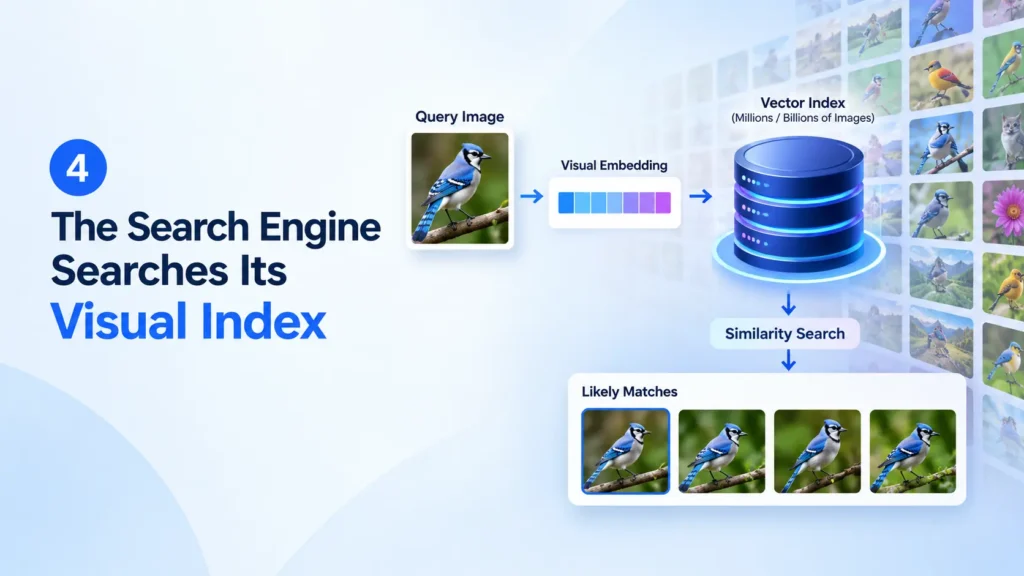
The system now needs to compare the visual query with indexed content.
Large visual search systems can contain millions or billions of images, so checking every image one by one would be inefficient.
Instead, visual search software uses techniques such as vector indexing and similarity search to find likely matches quickly.
The stored images already have their own visual embeddings. The new query image is compared against those representations to identify a smaller group of candidates.
5. The System Retrieves Relevant Results
This is the retrieval stage.
The search engine pulls candidate results that appear relevant to the visual query. Similarity can be measured in different ways; cosine similarity is one common method for comparing vectors.
A high similarity score can indicate that two representations are close in the relevant vector space.
But similarity alone isn’t enough.
A visually similar product may be out of stock, belong to the wrong category, have a different price, or fail to match the user’s actual intent.
That’s why modern systems need another stage.
6. AI Filters, Ranks, and Reranks the Results
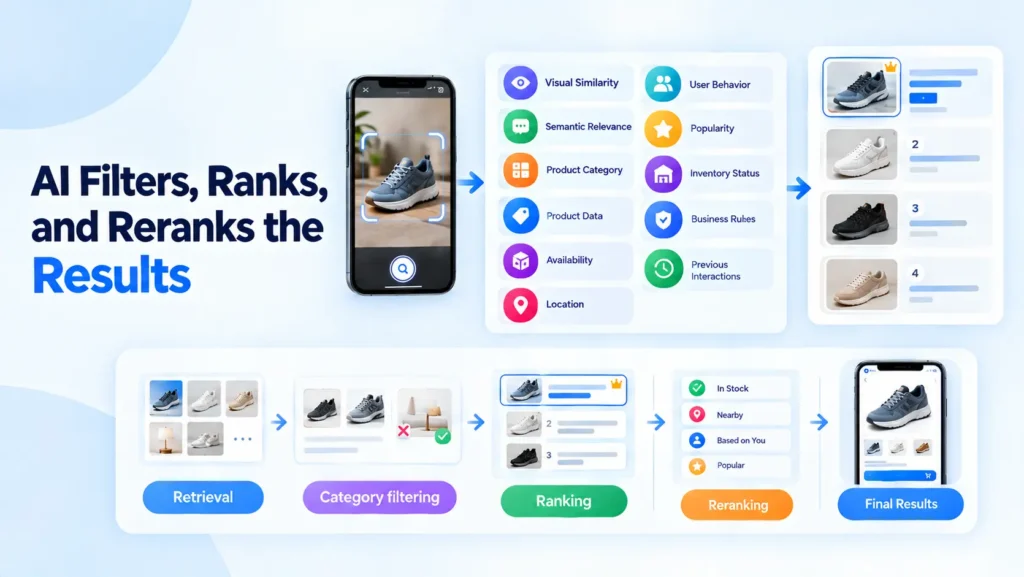
Retrieval finds candidates. Ranking decides what the user sees first.
A visual search system may consider:
- visual similarity
- semantic relevance
- product category
- product data
- availability
- location
- user behavior
- popularity
- inventory status
- business rules
- previous interactions
A useful ecommerce search pipeline can be thought of like this:
Retrieval
Find potentially relevant products.
↓
Category filtering
Remove results from clearly unrelated categories.
↓
Ranking
Order the remaining candidates using relevance and other signals.
↓
Reranking
Apply additional context such as availability, user intent, behavioral data, or business rules.
↓
Final results
Show the most useful options to the user.
For example, category filtering can prevent a visually similar lamp from competing directly with a shoe when the system knows the user is looking for footwear.
Pinterest Engineering has reported cumulative relevance gains of more than 160% for its Shop The Look experience after improvements involving training data, object detection, and visual embeddings. Pinterest also found that category-specific indexes helped address mismatches where visually similar items belonged to different product categories. This illustrates why visual similarity needs to be combined with category understanding and structured product data.
Strong product data taxonomy also matters. If product attributes, SKUs, variants, and inventory information are incomplete, even a strong visual model can produce poor shopping results.
Retrieval and ranking should therefore be treated as separate parts of the visual search process: retrieval creates a relevant candidate set, while ranking and reranking determine which candidates best satisfy the user’s goal.
7. Context and User Intent Refine the Results
Modern visual search increasingly combines visual information with context.
A user might upload a picture of a black jacket and ask:
“Find something similar in brown.”
The system now has two inputs:
Visual query: jacket shape, style, texture and other visual characteristics.
Text query: brown.
The final results can be based on both.
This is where visual search starts to overlap with multimodal search and semantic search.
Summary Table
The technology behind visual search can be summarized in five main layers.
| Layer | What happens |
| Image processing | The image is prepared and analyzed |
| Visual understanding | Objects, features, text and scenes are identified |
| Embedding | Visual information is converted into numerical representations |
| Retrieval | Similar or relevant candidates are found |
| Ranking | Candidates are filtered and ordered using context and other signals |
Simply put:
Query image
↓
Preprocessing
↓
Object detection and feature extraction
↓
Visual embedding
↓
Vector index
↓
Similarity search
↓
Candidate retrieval
↓
Category filtering
↓
Ranking and reranking
↓
Context and user intent
↓
Search results
This sequence shows how visual search moves from the raw image to a ranked, context-aware result. Real implementations can contain additional retrieval, classification, personalization, and business-rule layers.
How Does AI Understand What Is in an Image?

Computer vision gives the system ways to interpret the contents of an image rather than simply comparing raw pixels.
What Is Fan-Out Search?
Google describes fan-out search as a method that lets AI break a visual question into multiple related searches. In AI Mode, Gemini can analyze an image alongside the user’s question and decide which tools to invoke, including Google Lens, to retrieve information about multiple objects.
Circle to Search provides a practical example of this approach, allowing users to search multiple objects or regions within an image. Instead of treating an entire photograph as one query, object detection finds individual objects, while fan-out turns those objects or regions into separate searches for relevant information.
Google’s Dounia Berrada, a Search Senior Engineering Director, has explained this approach publicly. Google has compared the relationship between the AI model and visual search system to a brain and library: the model can interpret what it sees, while the search backend provides access to a much larger collection of information.
Fan-out can also start with text rather than an uploaded image. A user may begin with a text query in AI Mode, notice an image they like, and ask for more options similar to that specific result. The selected image can then become the starting point for further searches.
The approach is not limited to ecommerce. Google describes examples such as photographing a garden and asking about each plant’s care, photographing a museum wall and asking about individual paintings, or photographing a bakery window and asking what the different pastries are.
How Are Visual Search Results Ranked?
A good visual search system isn’t necessarily the one that finds the mathematically closest image. It is the one that finds the most useful result for the user’s goal.
For example, suppose someone uploads a photo of a pair of sneakers. Three products may look highly similar:
- The exact model but sold out
- A visually similar model that is available
- A less similar model that matches the user’s selected size
The best final result may not simply be the first item returned by similarity search.
This trade-off shows why ranking needs to consider the user’s actual goal rather than visual similarity alone. In a shopping context, a slightly less similar product that is available in the correct size can be more useful than an exact visual match that cannot be purchased.
Visual Search Cold Start
A new product can create a visual search cold start problem because it has little or no interaction history. Without enough clicks, selections, or purchases, the system has fewer behavioral signals to determine which result users are most likely to prefer.
The visual model can still recognize the product, but ranking has less information about user preferences and engagement. This can make newly launched products, catalogs, or visual-search applications harder to rank effectively.
How Does Multimodal AI Change Visual Search?

Multimodal AI allows visual and text information to be used together.
Instead of asking only:
“What looks like this?”
a user can ask:
“Find this style in blue.”
or:
“Find a similar dining table that seats six.”
The image provides information that is difficult to describe with keywords. The text adds the specific requirement.
This is particularly useful for ecommerce, where visual search can solve the discovery problem, while text can refine the purchase criteria.
This combination is sometimes called cross-modal search because information from different modes, such as images and language, is brought together.
How Does Google Lens Use AI Visual Search?

Google Lens is one of the best-known examples of visual search AI in everyday use.
A user can point a phone camera at an object or upload a picture. Depending on the query, Lens can identify objects, return similar images, surface webpages, provide product information, and support AI-generated answers.
Google’s current explanation of visual search shows how the technology has moved beyond simple image matching. Lens can identify individual objects in a scene, while newer Search experiences can use a visual search fan-out approach to trigger multiple searches from one image.
For example, a photograph of an outfit can contain several searchable items. Instead of requiring the user to search for the jacket, shoes, and hat separately, the system can identify those components and search for them together.
That illustrates an important change in visual search technology:
Older model:
Image → similar images
Modern model:
Image → visual understanding → object detection → multiple searches → retrieval → ranking → context-aware results
Google has also expanded visual search to video-based experiences, where users can search moving objects and ask questions about what appears in a video.
What Are the Different Types of AI Visual Search?
AI visual search can refer to several related search methods.
| Type | Main purpose |
| Reverse image search | Find the same or related image |
| Visual similarity search | Find images that look similar |
| Visual product search | Find products matching an image |
| Object-based search | Search for a particular object in an image |
| Semantic visual search | Understand the meaning or content of an image |
| Multimodal search | Combine image and text queries |
| Video visual search | Find objects, scenes, or moments inside videos |
Keeping these categories separate makes it easier to understand what a particular visual search application actually does.
How Does AI Visual Search Work With Video?
AI visual search from videos adds another layer because a video contains many frames rather than one still image.
A typical process looks like:
Video → frame sampling or key-moment detection → visual analysis → indexing → search → relevant moment
The exact process depends on the system. Some platforms may sample frames, detect important moments, or use other methods to represent the visual content of a video.
The system can then analyze objects, scenes, text, and other visual information across the indexed frames.
Canto, for example, says its AI Visual Search can identify relevant clips within video assets and combine visual information with natural-language queries and metadata.
This makes visual search software useful for large media libraries where manually watching every video would take too long.
What Data Does AI Visual Search Need?
A strong model is only one part of a useful visual search system.
The quality of the underlying data matters too.
Visual Training Data
Models need examples to learn how objects and visual patterns appear under different conditions.
Image Metadata and Attributes
Metadata can add information that may not be obvious from the image itself.
Canto, for example, combines visual analysis with custom metadata, product names, locations, and SKU numbers in its hybrid search system.
Useful information can include:
- product names
- categories
- locations
- SKUs
- brands
- attributes
- descriptions
Product Catalogs and Taxonomies
E-commerce visual search depends heavily on clean catalog data.
Useful information includes:
- SKUs
- categories
- product attributes
- variants
- prices
- inventory status
- product photography
- brand information
Catalog sync latency can also matter. If the visual search system says a product is available when the ecommerce inventory has already changed, the search experience suffers.
A practical ecommerce visual-search system therefore connects several layers:
| Data / System | Role in visual search |
| Product photography | Provides visual information |
| Product taxonomy | Defines product categories |
| Attributes | Adds structured product details |
| SKUs | Identifies individual products |
| Variants | Handles size, color, and other options |
| Inventory | Prevents unavailable results |
| Metafields | Adds additional product context |
| Catalog sync | Keeps search data current |
Human Feedback and Search Behavior
Clicks, selections, purchases, and other behavioral data can help businesses understand which results are actually useful.
Human review can also help evaluate whether retrieved results are genuinely relevant and identify cases where the model or ranking system needs improvement.
Why Does AI Visual Search Sometimes Get Results Wrong?
AI visual search isn’t perfect.
The result depends on several parts of the system, not just the AI model.
Poor Image Quality
Blur, poor lighting, low resolution, and heavy compression can hide important visual features.
Occluded or Partially Visible Objects
A handbag hidden behind a person or a shoe partly covered by another object is harder to identify.
Complex or Cluttered Images
If several objects overlap, the system may focus on the wrong item.
Weak Visual or Semantic Matches
Two products can look similar while serving completely different purposes.
Poor Indexes and Incomplete Metadata
If the relevant product or image isn’t properly indexed, the system can’t retrieve it.
Model Bias and Other Limitations
Training data can affect what a model recognizes well. Privacy is another consideration, especially when users upload personal photographs.
Canto provides one example of a privacy-focused approach: it says its visual-search processing operates within its own environment and that customer assets remain within its account storage rather than being sent to an external third party.
Where Is AI Visual Search Used?
AI visual search is now used across several industries.
Google Lens
Google uses visual search to help people identify objects, explore products, find related information, and search using images rather than only words. Google’s newer visual-search experiences can also identify multiple objects in a single image and use visual search fan-out to perform multiple related searches.
Pinterest Lens
Pinterest Lens lets users search visually for things they discover in the real world or in images. Pinterest has used visual search to connect objects with related ideas and products.
Pinterest says its platform processes roughly 600 million visual searches per month, illustrating the scale at which visual discovery can operate. This large volume of visual queries gives Pinterest substantial search activity to support product discovery and recommendations.
ASOS Style Match
ASOS Style Match was designed around a simple fashion problem: shoppers often see an outfit or clothing item without knowing what words to use to find it.
The tool allows users to upload a photo and find similar fashion items in the ASOS catalog. When it launched globally, ASOS said Style Match could search an inventory of more than 85,000 products, with thousands of new items added regularly.
The scale of that catalog also explains why keyword search could become difficult to maintain as the inventory changed. ASOS reported managing around 85,000 customer-facing SKUs while adding about 5,000 new SKUs each week, creating a constantly changing catalog where visual discovery could help shoppers find products without knowing the exact words to describe them.
eBay
eBay has used computer vision to let shoppers search for products using photographs. Its mobile visual-search features have included searching from camera-roll images and finding visually similar marketplace listings.
The SIGIR research associated with eBay analyzed roughly 1.6 million image queries from the eBay mobile app, providing a large-scale example of how shoppers actually use image-based ecommerce search.
Bing Visual Search
Bing Visual Search lets users search the web with an image rather than text. Microsoft says it can find similar images, identify products, surface pages containing an image, and provide other information from the uploaded picture. Users can also drag and drop an image, upload one, take a photo, or paste an image URL.
Amazon StyleSnap
Amazon StyleSnap launched in 2019 as an AI-powered fashion search feature that lets shoppers upload a photograph or screenshot of a look and receive similar product recommendations.
Amazon says StyleSnap uses image recognition, deep learning, object detection, and visual embeddings to identify apparel and compare visual characteristics such as color, pattern, and style.
The approach was later extended beyond fashion into areas such as home furnishings, showing how image-based product discovery can be applied to other visually driven categories.
Snapchat Scan
Snapchat Scan uses visual recognition through the Snapchat camera. Snap reported that its technology could identify hundreds of dog breeds, more than 600,000 plants and trees, and millions of songs and products. It also expanded Scan into fashion, including outfit-based shopping recommendations through Screenshop.
Canto
Canto applies AI visual search to digital asset management. Users can search image and video libraries using natural language, while the system can combine visual information with metadata and other signals.
OpenAsset
OpenAsset demonstrates another enterprise use: searching large professional image libraries using visual concepts and structured project information. This shows that visual search isn’t limited to retail; it can also help organizations find useful assets inside large business databases.
OpenAsset says its AI visual search model is pre-trained on 400 million images. The model runs within OpenAsset and its AWS environment, while the generated vectors remain within the customer’s OpenAsset data boundary rather than being sent to a third party for analysis.
Non-Ecommerce Uses
Visual search also has applications beyond shopping, including landmark recognition for travel, sign and menu translation, property and interior-design search in real estate, car and parts identification in automotive, artwork identification in museums, and nutritional estimation from food photos.
Where Visual Search Helps, and Where It Doesn’t
Visual search is especially useful when people can recognize what something looks like but struggle to describe it with keywords. Fashion and apparel are a strong fit because cut, pattern, drape, styling, and overall appearance can be difficult to capture with a short text query. Home decor and furniture also benefit when shoppers want to find a similar sofa, table, lamp, or room style based on appearance. Jewelry and accessories are another natural use case because shape, color, material, and styling can be easier to show than describe.
Social media adds another important discovery use case. A shopper may screenshot an outfit from Instagram or TikTok and want to find the jacket, shoes, or accessories without knowing the product names or keywords needed to describe them.
But visual search isn’t equally useful for every purchase. It adds relatively little for commodities, consumables, and spec-driven products where the decision depends on an exact model number, technical specification, or ingredient list. For example, someone looking for batteries, printer ink, or supplements may get more useful results by searching for the exact product code, compatible model, or ingredient information.
Why Is AI Visual Search Important for Businesses?

The biggest benefit is simple: it reduces the amount of information users have to describe themselves.
Someone may know exactly what a product looks like but have no idea what it is called.
That creates a problem for keyword search.
Visual search removes some of that friction.
For ecommerce businesses, the potential benefits include:
- faster product discovery
- better support for mobile shoppers
- easier discovery from social media images
- stronger product recommendations
- more useful search for visually driven categories such as Fashion, Furniture, Jewelry, and Accessories
But businesses shouldn’t treat visual search as a replacement for keyword search.
The strongest systems can combine both.
What the Research Actually Shows
The value of visual search isn’t only theoretical.
A useful research example comes from a SIGIR 2021 study titled An Image Is Worth a Thousand Terms? Analysis of Visual E-Commerce Search. The researchers analyzed image and text queries in an e-commerce setting and compared several search-behavior measures.
The researchers analyzed roughly 1.6 million image queries from the eBay mobile app. The SIGIR 2021 paper reported a 0.481 image-to-text CTR ratio and a 1.113 MRR ratio for clicked queries. The paper also reported category-level MRR ratios of 1.211 for Toys & Hobbies, 1.163 for Home & Garden, and below 1 for some other categories, showing that results varied substantially by category.
MRR, or mean reciprocal rank, is a ranking metric that rewards systems when the first relevant result appears near the top.
The important takeaway isn’t that visual search is automatically better for every product or every user.
It is that visual queries can behave differently from text queries, and their effectiveness can vary significantly by product category and search context.
That distinction matters when evaluating visual search technology.
Related 2025 Research on Visual Search Behavior
A 2025 study by Aini Putkonen, Yue Jiang, Jingchun Zeng, Olli Tammilehto, Jussi P.P. Jokinen, and Antti Oulasvirta, published in the International Journal of Human-Computer Studies, examined visual search in graphical user interfaces using 84 participants and 900 real-world GUIs.
The researchers found that factors including target absence, cue type, and GUI type had major effects on search time. They also described visual search as a three-stage process: Guess, Scan, and Confirm.
This research isn’t an e-commerce AI visual-search benchmark, so it shouldn’t be used to claim that AI visual search has a particular conversion-rate advantage.
But it reinforces a useful point: the design of the search task and the information presented to users can significantly affect how quickly they find what they need.
How Can Websites Optimize for AI Visual Search?
There is no single trick that guarantees visibility in visual search.
Instead, focus on making images and product information easy for both people and search systems to understand.
Use High-Quality Product Images
Clear product photography gives visual systems more useful information.
Use multiple angles where appropriate and avoid unnecessary clutter.
Add Descriptive Image Information
Alt text, surrounding text, filenames, captions, and structured product information can provide useful context.
Maintain Accurate Product Data
Keep categories, attributes, variants, SKUs, prices, and Inventory Status accurate.
Visual search can identify a product visually, but good Catalog Data helps the system connect that product to useful commercial information.
Keep Visual and Textual Information Consistent
If the image shows a brown leather chair but the product information describes a blue fabric stool, the overall search experience becomes confusing.
Strong visual and textual consistency supports both traditional keyword search and visual search optimization.
Keep Product Data and Inventory in Sync
Visual search can retrieve a product that looks correct, but the result is still poor if the product is unavailable or the selected variant no longer exists.
Businesses using ecommerce visual search should therefore keep their catalog, variants, inventory, and search index synchronized as closely as possible.
Final Takeaway
AI visual search is more than uploading a picture and finding something that looks similar. The same AI shift is happening on the creation side too, as our Gramhir.pro AI image generator review shows.
A modern system can understand an image, detect objects, extract visual features, create image embeddings, search a visual index, retrieve candidates, rank them, and combine the results with metadata, text, and user intent.
That is why visual search is moving beyond simple image matching.
For shoppers, it can turn “I saw this somewhere” into a searchable query. For businesses, it can connect product photography and catalog data with a much more natural way of discovering products and information.
The technology will continue to change, but the basic idea remains straightforward:
Instead of forcing people to describe what they see, visual search lets the image become the query.
Frequently Asked Questions
How does AI visual search work?
AI visual search analyzes an image, turns its visual features into searchable data, and finds relevant results based on similarity and context.
Does AI visual search use computer vision?
Yes. Computer vision helps AI identify objects, shapes, colors, text, and other visual features in an image.
Does visual search use vector databases?
Many systems use vector indexes or databases to quickly compare image embeddings and find visually similar results.
What is the difference between visual search and reverse image search?
Reverse image search looks for the same or related images. Visual search can understand what’s in an image and find similar products, objects, or concepts.
Can AI visual search understand text?
Yes. OCR can read text inside an image and use it as another signal when finding relevant results.
Can AI visual search identify multiple objects?
Yes. It can detect separate objects in one image and search for them individually, such as finding a jacket, shoes, and bag from one outfit photo.
Can AI visual search work with video?
Yes. Some systems analyze video frames or key moments, allowing users to search for objects, scenes, or relevant sections within videos.
How accurate is AI visual search?
Accuracy depends on image quality, the AI model, indexing, metadata, and available product data.