


Table of Contents
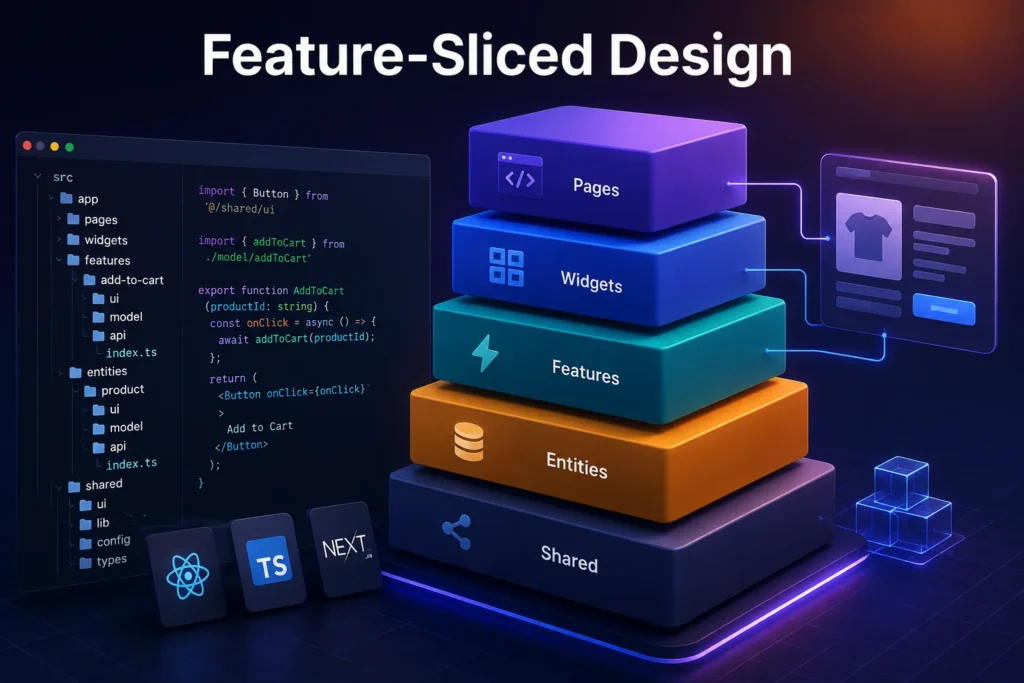
Feature-Sliced Design (FSD) is a frontend architecture methodology that organizes code into layers, business domains, and technical segments. It gives developers clear rules for deciding where code belongs and how different parts of an application can depend on each other.
Instead of organizing everything into folders such as components, hooks, and utils, FSD uses a feature-oriented frontend structure built around Pages, Widgets, Features, Entities, and Shared. This keeps related code closer together and makes large codebases easier to navigate.
You can use FSD with React, Next.js, Vue.js, Angular, and TypeScript. It is particularly useful for large or growing frontend applications that need stronger boundaries, maintainability, and scalability.
What Problems Does Feature-Sliced Design Solve?
A frontend application can become difficult to maintain when it is organized only by technical type.
A project might begin with:
src/
├── components/
├── hooks/
├── services/
├── utils/
├── types/
├── api/
└── pages/
This looks simple at first. As the application grows, however, business functionality becomes scattered.
A product-related feature might require:
components/ProductCard.tsx
components/AddToCartButton.tsx
hooks/useCart.ts
services/cartApi.ts
services/productApi.ts
types/product.ts
utils/price.ts
A developer working on the product area has to search through several unrelated folders to understand how the pieces fit together.
FSD approaches the same problem from a business-oriented perspective:
entities/
└── product/
features/
└── add-to-cart/
widgets/
└── product-list/
pages/
└── product-details/
The difference is not simply the number of folders. It is the ownership and dependency model behind them.
FSD encourages developers to organize code around business concepts while still separating technical responsibilities such as UI, API, and model logic.
How Does Feature-Sliced Design Organize a Frontend Project?
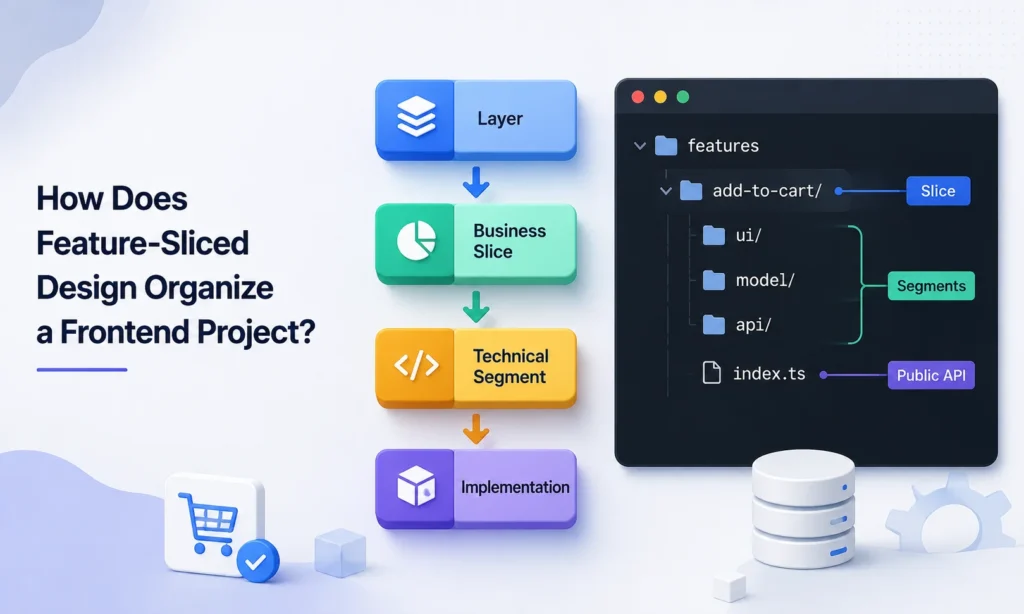
FSD organizes a frontend project through layers, slices, and segments. A layer explains how broad or influential a piece of functionality is, a slice explains which business area owns it, and a segment explains what the code does technically. These levels work together to create the core sliced architecture pattern.
For example, an online store might have an entities/product slice for product-related data and UI. It could also have a features/add-to-cart slice for the action of adding a product to a cart. Inside these slices, ui, api, and model can separate interface, data access, and business logic.
A useful way to think about the hierarchy is:
Layer
↓
Business Slice
↓
Technical Segment
↓
Implementation
For example:
features/
└── add-to-cart/ ← Slice
├── ui/ ← Segment
├── model/ ← Segment
├── api/ ← Segment
└── index.ts ← Public API
Layers define architectural responsibility, slices define business meaning, and segments define technical purpose. This is the simplest way to understand the three levels of FSD.
What Are Layers, Slices, and Segments?
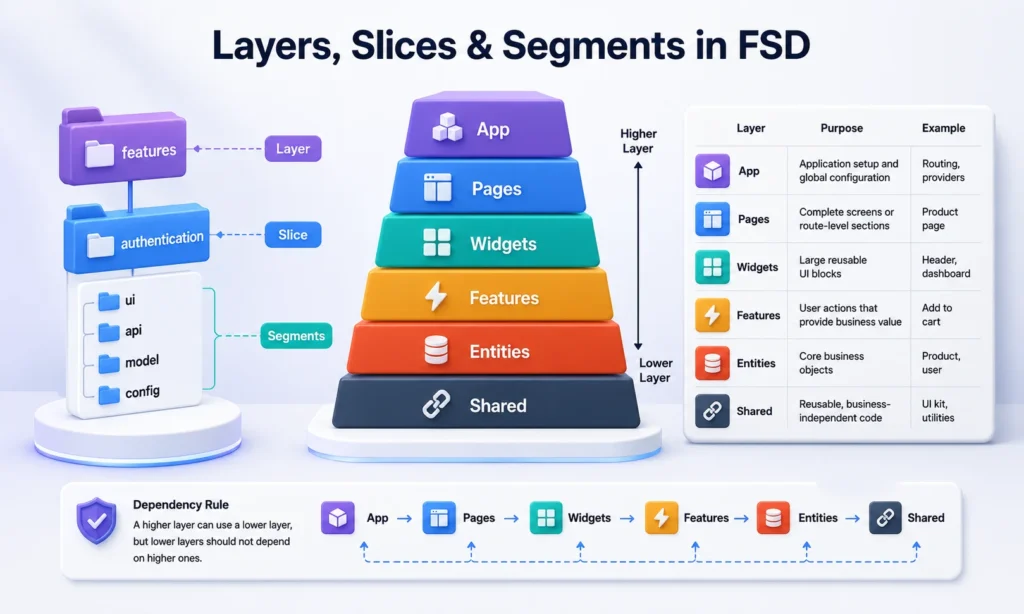
The three building blocks of Feature-Sliced Design are layers, slices, and segments. Each one solves a different organization problem, so they should not be treated as interchangeable terms.
| Structure | What it defines | Main purpose | Example |
| Layer | Architectural responsibility | Shows where code sits in the overall FSD architecture | Features |
| Slice | Business or product domain | Groups related code around one business concept | Authentication |
| Segment | Technical purpose | Organizes code inside a slice by what it does | UI, API, Model |
Layers describe responsibility, slices describe business meaning, and segments describe technical purpose. This is the simplest way to understand the three levels of FSD.
Consider an authentication feature:
features/
└── authentication/
├── ui/
├── api/
├── model/
└── config/
Here, features is the layer, authentication is the slice, and ui, api, model, and config are segments. This structure creates a sliced design pattern without requiring every project to follow exactly the same folder tree.
- Layers in Feature-Sliced Design
Current FSD guidance follows a “pages first” approach: keep page-specific UI, data logic, and behavior inside the Page until there is a real reason to extract them into another slice.
| Layer | Purpose | Example |
| App | Application setup and global configuration | Routing, providers |
| Pages | Complete screens or route-level sections | Product page |
| Widgets | Large reusable UI blocks | Header, dashboard |
| Features | User actions that provide business value | Add to cart |
| Entities | Core business objects | Product, user |
| Shared | Reusable, business-independent code | UI kit, utilities |
The official documentation also lists Processes, but marks that layer as deprecated. App and Shared are divided directly into segments, while Pages, Widgets, Features, and Entities contain slices.
The dependency direction is also important. A higher layer can use a lower layer, but lower layers should not depend on higher ones. This helps prevent circular dependencies and keeps the sliced architecture predictable.
What Does the App Layer Contain?
The Feature-Sliced Design App layer contains application-wide concerns. This can include routing, providers, global styles, application initialization, and other configuration that affects the whole frontend. It sits at the top of the architecture because it connects different parts of the application.
The App layer should not become a general folder for code that developers cannot classify. Business-specific functionality should normally remain inside an appropriate Page, Widget, Feature, or Entity. This keeps application-level code separate from individual product capabilities.
What Does the Pages Layer Contain?
The Pages layer represents complete application screens. A Page usually corresponds to a route or user-facing screen and composes the Features, Widgets, and Entities needed to display that screen. For example, an online store may have home, products, product-details, and checkout pages.
Current FSD guidance also supports keeping page-specific code inside the Page when it is not reused elsewhere. This avoids creating extra abstractions simply to make the folder structure look more complex. The result is a practical frontend folder structure that can grow without forcing every component into another layer.
Pages-first approach
A practical way to apply this principle is:
Start with the Page. Extract code only when reuse, business meaning, or independent responsibility justifies the extraction.
For example:
pages/
└── checkout/
└── ui/
└── CheckoutPage.tsx
If the checkout page contains a small piece of UI used nowhere else, it does not automatically need to become a Widget.
What Does the Widgets Layer Contain?
Feature-Sliced Design Widgets are larger UI compositions that combine several modules into a meaningful block. A dashboard section, product list, navigation area, or application header can become a Widget when it has enough independent responsibility.
Widgets are optional rather than mandatory. If a piece of UI is used only on one Page and does not have an independent reason to exist, it can remain within that Page. This keeps the feature sliced approach flexible and prevents unnecessary abstraction.
What Does the Features Layer Contain?
Feature-Sliced Design Features represent meaningful user actions or business interactions that deliver value. Common examples include logging in, registering an account, filtering products, adding an item to a cart, submitting an order, or changing account settings.
A Feature should describe a complete business action rather than a small UI element. For example, ProductFilter can be a Feature because it represents a meaningful user task, while a generic Button belongs in Shared because it has no business-specific meaning.
What Does the Entities Layer Contain?
Feature-Sliced Design Entities represent important business concepts that the application works with. Typical examples include User, Product, Order, Account, Post, and Article.
An Entity can contain the data, UI, and behavior directly related to that business concept. For example, a product Entity might include product types, a ProductCard, product-related API logic, or validation rules.
The key distinction is that an Entity represents a business object, while a Feature represents an action involving that object. For example, Product is an Entity, while AddToCart is a Feature.
A simple rule to remember: Entities are what the business has; Features are what users do with them.
What Does the Shared Layer Contain?
The Feature-Sliced Design Shared layer contains reusable code that does not belong to a specific business domain. Common examples include generic UI components, API clients, utilities, configuration, and general-purpose libraries.
A generic Button can belong to Shared because it has no product-specific meaning. A ProductPrice component that contains product business rules should normally stay closer to the Product Entity. This prevents Shared from becoming a new dumping ground for code that developers do not know where to place.
What Happened to the Processes Layer?
Processes is a deprecated Feature-Sliced Design layer. Older versions of FSD used Processes for complex multi-page interactions, which is why older tutorials and examples may still show it as a normal layer. Current guidance recommends using the other layers instead.
This distinction is important when researching feature sliced design documentation or older feature sliced design GitHub examples. Not every FSD article available online reflects the current methodology. Developers starting a new project should check the current specification before copying an older structure.
- Slices in Feature-Sliced Design
A slice groups code according to its business or product meaning. Slice names depend on the application, so an e-commerce application may have product, order, and cart, while a social platform may have post, comment, and profile.
For example:
entities/
├── product/
├── user/
└── order/
features/
├── add-to-cart/
├── login/
└── product-filter/
The important point is that a slice represents what the code is about, not merely what technology it uses.
Slices should have a clear purpose and should avoid unnecessary dependencies on other slices at the same layer. This keeps business domains easier to understand and change.
It is one of the main differences between feature-oriented design and a purely technical folder structure.
- Code Organization Inside a Slice?
Segments divide a slice according to technical purpose. Common segments include ui, api, model, lib, and config.
For example:
entities/
└── product/
├── ui/
├── model/
├── api/
├── lib/
└── index.ts
A ui segment can contain interface components, an api segment can handle data requests, and a model segment can contain state and business logic.
Not every slice needs every segment. Creating folders simply because they appear in an example can add unnecessary complexity. Good feature sliced best practices use segments only when they make the code easier to find and understand.
A practical rule is:
| Segment | Typical responsibility |
| ui | Components and presentation |
| model | State, business logic, selectors |
| api | Requests and data access |
| lib | Slice-specific helpers |
| config | Slice-specific configuration |
| consts | Slice-specific constants |
Real Example: An Add-to-Cart Feature
Consider an e-commerce add-to-cart Feature:
features/
└── add-to-cart/
├── ui/
├── model/
├── api/
└── index.ts
The three segments can have simple responsibilities:
// api/
export const addToCart = (productId: string) =>
fetch(“/api/cart”, {
method: “POST”,
body: JSON.stringify({ productId }),
});
// model/
export const useAddToCart = (productId: string) => () =>
addToCart(productId);
// ui/
export function AddToCartButton({ productId }: { productId: string }) {
const add = useAddToCart(productId);
return <button onClick={add}>Add to cart</button>;
}
Here, api handles the backend request, model contains the Feature behavior, and ui connects that behavior to the interface. The Feature can expose AddToCartButton through its index.ts Public API rather than exposing its internal files.
What Does a Feature-Sliced Design Folder Structure Look Like?
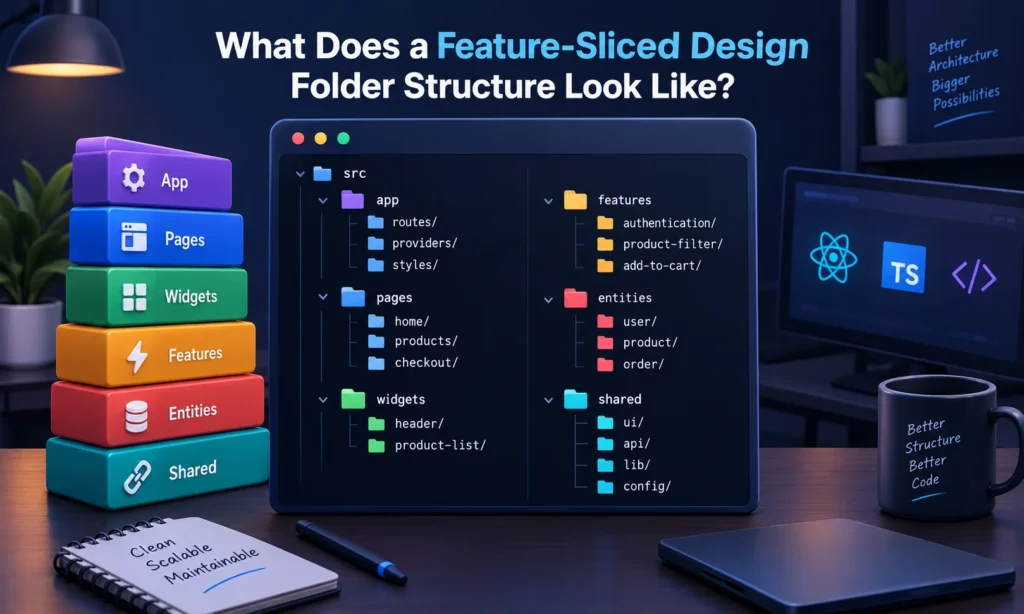
A practical feature sliced design example for a React and TypeScript application might look like this:
src/
├── app/
│ ├── routes/
│ ├── providers/
│ └── styles/
│
├── pages/
│ ├── home/
│ ├── products/
│ └── checkout/
│
├── widgets/
│ ├── header/
│ └── product-list/
│
├── features/
│ ├── authentication/
│ ├── product-filter/
│ └── add-to-cart/
│
├── entities/
│ ├── user/
│ ├── product/
│ └── order/
│
└── shared/
├── ui/
├── api/
├── lib/
└── config/
This is an example, not a mandatory template. The official methodology allows projects to use only the layers that provide value. The purpose of the feature sliced structure is to make the application easier to understand, not to maximize the number of folders.
How Do FSD Dependency Rules Work?
Feature-Sliced Design uses a one-way dependency rule between layers. Higher layers can use lower layers, but lower layers should not depend on higher layers or other slices at the same layer.
| Layer | Can depend on | Should not depend on |
| App | Pages, Widgets, Features, Entities, Shared | — |
| Pages | Widgets, Features, Entities, Shared | App |
| Widgets | Features, Entities, Shared | Pages, App |
| Features | Entities, Shared | Widgets, Pages, App |
| Entities | Shared | Features, Widgets, Pages, App |
| Shared | Its own modules | App, Pages, Widgets, Features, Entities |
In simple terms:
App → Pages → Widgets → Features → Entities → Shared
For example, a Feature can use an Entity, but an Entity should not import a Feature. This keeps dependencies predictable and helps prevent circular architectural relationships.
When two Entities need a controlled cross-reference, FSD provides the @x notation rather than encouraging unrestricted imports between slices. z
Why Are Public APIs Important in Feature-Sliced Design?
A Public API means other slices depend on what a module exposes, not on its internal file structure, making refactoring safer. Instead of importing internal files directly, developers access the functionality exposed by the slice’s public entry point, often through an index.ts file.
For example:
features/
└── authentication/
├── ui/
├── model/
├── api/
└── index.ts
This protects the internal structure of the slice. Developers can reorganize internal files later without forcing other parts of the application to update every import.
How to Implement Feature-Sliced Design
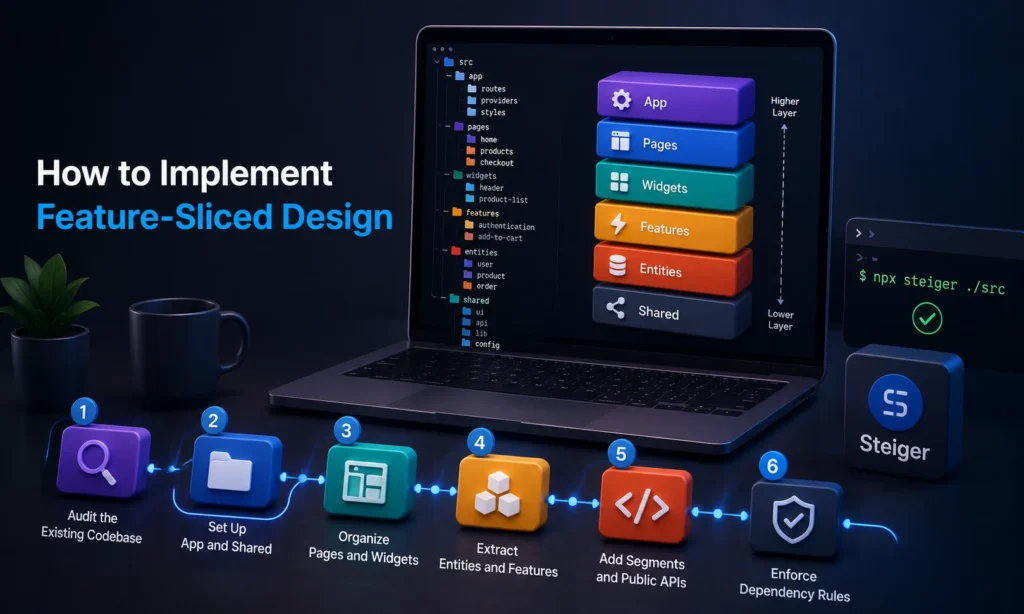
You do not need to rewrite an entire frontend before seeing value from FSD. The official migration guidance recommends a Pages-first approach and incremental extraction rather than automatically moving every existing module into a Feature or Entity.
1. Audit the Existing Codebase
Start by mapping your current components, hooks, services, utils, and pages to business domains.
Identify concepts such as:
- users
- products
- orders
- payments
- authentication
- billing
Then ask:
Is this code specific to one Page, or is it actually reused elsewhere?
This question is important because current FSD guidance favors keeping single-use code in the Page instead of creating unnecessary slices.
2. Set Up App and Shared
Move routing, providers, global styles, and application setup into App.
Put genuinely reusable UI, utilities, API clients, and configuration into Shared.
For example:
app/
├── routes/
├── providers/
└── styles/
shared/
├── ui/
├── api/
├── lib/
└── config/
Do not move business-specific code into Shared just because it is used by more than one component.
3. Organize Pages and Widgets
Move complete screens into Pages and identify large reusable UI blocks that belong in Widgets.
Keep page-specific code inside Pages when it is not reused elsewhere.
For example:
pages/
└── dashboard/
└── ui/
└── DashboardPage.tsx
widgets/
├── sidebar/
└── analytics-summary/
This follows the current Pages-first philosophy rather than forcing premature extraction.
4. Extract Entities and Features
Move important business objects into Entities and meaningful user actions into Features.
For example:
entities/
└── product/
features/
└── add-to-cart/
Do not create an Entity simply because a TypeScript interface exists.
Do not create a Feature for every button click.
Extract a module when it has a meaningful business boundary, reuse case, or independent responsibility.
5. Add Segments and Public APIs
Use ui, model, api, and other segments only where they improve organization.
Add Public APIs such as index.ts files so other modules do not depend on internal implementation details.
A simple Feature might become:
features/
└── add-to-cart/
├── ui/
├── model/
├── api/
└── index.ts
6. Enforce Dependency Rules
Finally, check that imports follow the FSD hierarchy.
You can manually review imports, but tooling can help detect violations as the project grows.
Steiger is an FSD-focused architecture and file-structure linter. Its official repository provides built-in rules for validating adherence to FSD, including configurable rules and watch mode.
A basic installation is:
npm i -D steiger
npm i -D @feature-sliced/steiger-plugin
Then:
npx steiger ./src
The official Steiger documentation also supports configuration through steiger.config.ts or steiger.config.js.
How Do You Migrate an Existing Project to Feature-Sliced Design?
You can introduce Feature-Sliced Design gradually instead of rewriting the entire application.
A practical migration sequence is:
Existing Project
↓
Audit
↓
Pages First
↓
Shared Foundation
↓
Extract Reusable Widgets
↓
Extract Entities
↓
Extract Features
↓
Add Public APIs
↓
Fix Dependency Violations
↓
Enforce Rules
Before Migration
Suppose the project contains:
components/
hooks/
services/
utils/
pages/
Do not immediately create:
app/
pages/
widgets/
features/
entities/
shared/
and move everything randomly.
Instead, identify which code actually has independent business meaning.
After Incremental Migration
A section of the application might gradually become:
pages/
└── products/
widgets/
└── product-list/
features/
├── add-to-cart/
└── product-filter/
entities/
└── product/
shared/
└── ui/
This feature-oriented refactoring approach reduces the risk of a large architectural rewrite.
The official migration guide also recommends using tools such as Steiger to identify issues including insignificant slices and excessive slicing during migration.
How Do You Decide Where Code Belongs?
The best way to decide where code belongs is to ask what it represents and which part of the application owns it.
| Question | Likely location |
| Is it application initialization or global configuration? | App |
| Is it a complete screen? | Pages |
| Is it a meaningful reusable UI block? | Widgets |
| Is it an important user action? | Features |
| Is it a business object? | Entities |
| Is it generic and business-independent? | Shared |
For example:
Produc t → Entity
AddToCart → Feature
ProductList → Widget
ProductDetailsPage → PANGUage
Button → Shared
Router → App
A Simple Decision Tree
Is it application infrastructure?
│
├── Yes → App
│
No
↓
Is it a complete screen?
│
├── Yes → Pages
│
No
↓
Is it a meaningful reusable UI block?
│
├── Yes → Widgets
│
No
↓
Is it a valuable user action?
│
├── Yes → Features
│
No
↓
Is it a business object?
│
├── Yes → Entities
│
No
↓
Shared
This is only a guide. If a concept is used only once and has no independent architectural value, keeping it inside the Page can be the better FSD decision.
Where Should State Management Go in Feature-Sliced Design?
State should generally live close to the part of the application that owns it.
A useful distinction is:
| State type | Possible location |
| Component-only UI state | Component/Page |
| Feature-specific state | Feature model |
| Domain state | Entity model |
| Application-wide configuration | App |
| Generic infrastructure | Shared |
FSD does not require a specific state management library.
React, TypeScript, Redux, Zustand, and server-state tools can all be used with the methodology.
The key question is:
Which module owns this state, and who should be allowed to access it?
Avoid putting every piece of state into a global store simply because the application uses Redux or Zustand.
Does Feature-Sliced Design Work With React, Vue.js, and Angular?

Feature-Sliced Design works with React, Vue.js, Angular, and TypeScript because it is an architecture methodology, not a framework.
The official FSD documentation explicitly states that the methodology is not tied to a particular stack and can be used for web or native applications.
React, Vue, or Angular handles the UI and framework features, while FSD organizes the application into App, Pages, Widgets, Features, Entities, and Shared.
With TypeScript, types and interfaces can stay close to the Feature or Entity that owns them.
Next.js can also be combined with FSD, with Next.js handling routing and rendering while FSD organizes business logic and frontend modules.
For testing, teams can use unit and integration tests alongside tools such as Storybook for reusable UI components.
Common Mistakes in Feature-Sliced Design
The biggest mistake is treating FSD as a folder template.
Creating:
app/
pages/
widgets/
features/
entities/
shared/
does not automatically produce good architecture.
The real value comes from meaningful boundaries and correct dependencies.
1. Creating Every Layer Immediately
Not every project needs every layer.
If an application does not need Widgets or Entities, do not create them just because they appear in an example.
2. Creating Too Many Slices
A Feature used only by one Page may not need to be a separate Feature.
Current FSD guidance specifically emphasizes keeping single-use code close to where it is consumed and avoiding unnecessary slicing.
3. Putting Too Much Code Into Shared
This is one of the most common problems.
Bad:
shared/
├── ProductPrice.tsx
├── CartButton.tsx
├── UserProfile.tsx
└── OrderSummary.tsx
These components have business meaning.
Better:
entities/product/
features/add-to-cart/
entities/user/
widgets/order-summary/
Shared should remain genuinely business-independent.
4. Bypassing Public APIs
Avoid:
import { useCart } from “@/features/cart/model/useCart”;
when the Feature’s Public API is intended to be:
import { useCart } from “@/features/cart”;
Deep imports expose implementation details and make refactoring harder.
5. Allowing Invalid Layer Dependencies
Avoid:
entities/product
↓
features/add-to-cart
An Entity should not depend on a higher Feature layer.
6. Creating Segments Without a Purpose
Do not create:
ui/
api/
model/
lib/
config/
consts/
types/
helpers/
services/
hooks/
for every small slice.
Create a segment when it makes the code easier to understand.
7. Using FSD as Architecture Bureaucracy
Architecture should solve real problems.
If a developer needs ten minutes to decide which layer should contain a simple component, the architecture may be over-engineered.
What Are the Advantages and Disadvantages of Feature-Sliced Design?
Feature-Sliced Design can provide strong architectural boundaries, but it also introduces rules that teams need to learn and maintain.
| Advantages | Disadvantages |
| Clear dependency direction | Higher learning curve |
| Business-oriented structure | More architectural decisions |
| Easier navigation | Can create unnecessary folders if misused |
| Safer refactoring | Requires team discipline |
| Controlled reuse | Layer ownership can sometimes be difficult to decide |
| Better separation of concerns | May be excessive for small applications |
| Easier team collaboration | Poor implementation can become bureaucracy |
| Framework-independent methodology | Requires consistent enforcement |
The DEV comparison also identifies scalability, standardization, controlled connections, and business orientation as advantages, while noting the higher entry barrier and need for team awareness and discipline as disadvantages.
The important point is that these disadvantages do not necessarily mean FSD is a poor choice. They mean that FSD has an adoption cost and should be introduced when its architectural benefits justify that cost.
Comparison of Feature-Sliced Design With Other Architectures
Feature-Sliced Design overlaps with several software architecture approaches, including clean architecture, domain-driven design, atomic design, and modular architecture. However, each approach focuses on a different problem.
FSD focuses on organizing frontend applications through layers, business slices, segments, and dependency rules.
| Architecture | Main focus | Typical use |
| Feature-Sliced Design | Frontend layers and business domains | Complex frontend applications |
| Atomic Design | UI component hierarchy | Design systems and UI composition |
| Clean Architecture | Dependency direction and business rules | Strong architectural boundaries |
| Layered Architecture | Technical separation | Traditional application structures |
| Micro-frontends | Independent frontend applications | Large teams and products |
| Component-Based Architecture | Reusable UI components | Component-driven applications |
Feature Sliced Design vs Atomic Design
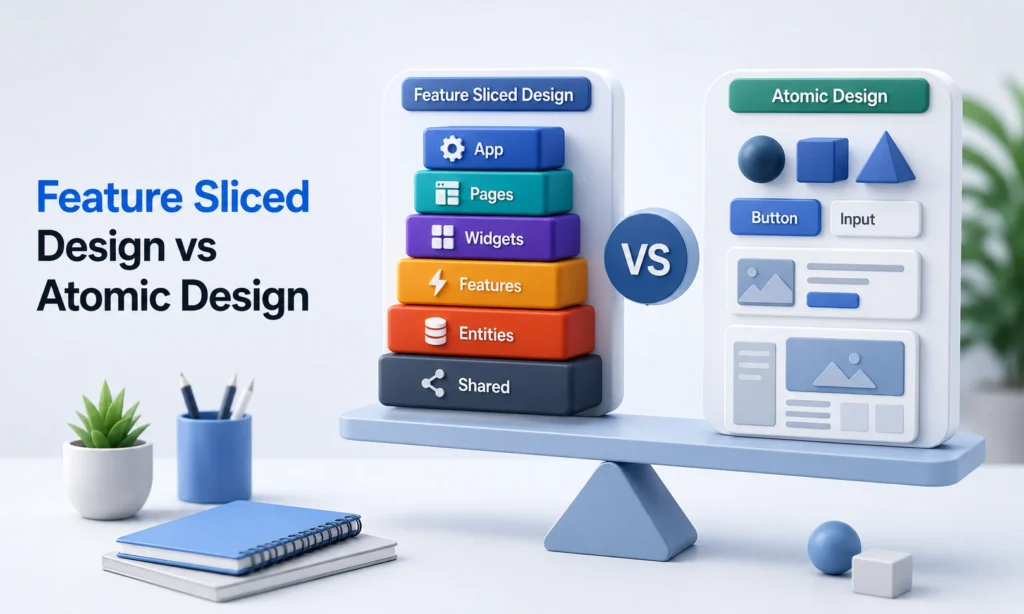
Feature Sliced Design vs Atomic Design is mainly a comparison between application architecture and UI organization. Atomic Design focuses on composing interfaces from smaller UI elements, while FSD organizes the broader application around business domains and dependencies.
The two approaches can also work together. For example, a project can use FSD to organize the application and use Atomic Design principles inside its Shared UI components. They solve different organizational problems.
Feature Sliced Design vs Clean Architecture
Feature Sliced Design vs Clean Architecture compares two approaches that both care about boundaries and dependency direction. Clean Architecture focuses on protecting core business rules from external implementation details, while FSD focuses specifically on organizing frontend applications.
The approaches can be combined when appropriate. Concepts such as dependency inversion, separation of concerns, modularity, and domain boundaries can influence an FSD implementation without requiring the project to become a strict Clean Architecture system.
Feature Sliced Design vs Layered Architecture
Traditional layered architecture often separates applications into technical layers such as presentation, business logic, and data access. MVC (Model-View-Controller) follows a similar separation principle by dividing responsibilities between the Model, View, and Controller, but it does not define the business-oriented slices and dependency rules found in FSD.
FSD combines architectural layers with business-oriented slices, making it easier to identify both the responsibility and business domain of a piece of code. This provides a more feature-oriented design than traditional layered or MVC structures
Feature Sliced Design vs Micro-Frontends
Micro-frontends divide a frontend into independently developed or deployed applications. FSD usually works inside an application and organizes its internal code rather than deciding how the entire product should be deployed.
A large organization can therefore use micro-frontends at the system level and FSD inside individual frontend applications. The two approaches operate at different architectural levels.
What Tools Can Help With Feature-Sliced Design?
GitHub is useful for exploring the official FSD documentation, examples, and related tooling. The FSD ecosystem also includes Steiger, a linter designed to detect architectural problems in FSD projects.
The official Feature-Sliced Design documentation repository has more than 2,400 GitHub stars and 223 forks, reflecting an established open-source community around the methodology.
Other frontend tools can work alongside FSD rather than being part of FSD itself. TypeScript, Storybook, CSS Modules, Nx, and Turborepo can support development, testing, styling, or monorepo workflows while FSD handles application organization.
Case Study: Using Feature-Sliced Design for a Web-Based Logistics Platform
The Starting Problem
Yellow Systems built a React-based logistics platform that had to work alongside an existing PHP system. As the frontend grew, managing the codebase became increasingly complex, while the business needed to continue developing without disrupting existing operations.
The FSD Approach
The team introduced Feature-Sliced Design to organize the frontend around business functionality rather than allowing the growing codebase to become tightly coupled.
The platform included multiple applications, including:
- Customer portal for managing orders and related services
- Crew app for schedules, locations, documents, and service updates
- Online booking for creating orders and booking estimates
The migration used APIs and a middleware layer so the new React frontend could continue communicating with the legacy PHP system during the transition.
Why FSD Helped
FSD gave the frontend a more modular structure, making business functionality easier to isolate and extend while the legacy and new systems operated together.
Measured Results
According to Yellow Systems’ published case study:
- 25% faster time-to-market for new features
- Improved frontend stability between the legacy and React systems
- More scalable and modular frontend architecture
- Internal users reported smoother UX and fewer errors
What This Shows
This case demonstrates that FSD is not only a folder-organization technique. In a growing business application, its boundaries can support incremental modernization, modular development, and faster feature delivery without requiring an immediate replacement of the entire legacy system.
FAQs
What Is Feature-Sliced Design?
Feature-Sliced Design is a frontend architectural methodology that organizes code into layers, business-domain slices, and technical segments. It is designed to make frontend applications easier to understand and maintain as they grow.
Do You Always Need an Entities Layer?
No. The Entities layer is optional when it does not provide a useful architectural boundary. If a business object is only used by one Page or Feature, keeping its code closer to that slice can be simpler. Create an Entity when the concept has enough independent meaning or reuse to justify its own boundary.
What Is the Difference Between a Slice and a Segment?
A slice represents a business or product domain, while a segment groups code within that slice according to technical purpose. For example, product can be a slice and ui, api, and model can be segments.
Can One Feature Import Another Feature?
Features on the same layer should generally avoid directly depending on each other. If two Features need to work together, their relationship can often be handled through a higher-level Page or Widget.
Is Feature-Sliced Design Only for React?
No. Feature-Sliced Design is not tied to React. It can be adapted to React, Vue.js, Angular, and other frontend technologies because the methodology focuses on application organization rather than framework-specific components.
When Is a Simpler Architecture Better?
FSD is not automatically the best choice for every project. A small website, simple prototype, or short-lived application may not have enough complexity to benefit from multiple layers and slices. Architecture should solve a real problem rather than add rules for their own sake. If a simple project is already easy to understand, a straightforward component-based architecture may be more practical.
Is Feature-Sliced Design Good for Small Projects?
It can be used for small projects, but it may not be necessary. The approach becomes more useful when the application has enough business logic, developers, or long-term changes to justify stronger architectural boundaries.
Is Feature-Sliced Design Better Than Atomic Design?
Neither approach is universally better. Feature Sliced Design vs Atomic Design is mainly a comparison between application architecture and UI organization, so the right choice depends on what you need to organize.
Is Feature-Sliced Design the Same as Clean Architecture?
No. Feature Sliced Design vs Clean Architecture involves two related but different architectural approaches. FSD focuses on frontend layers, slices, segments, and dependencies, while Clean Architecture focuses more broadly on dependency direction and protecting core business rules.

