


Table of Contents
A computer virus is malicious code that infects a host file or program and can reproduce when that host is executed. Computer viruses can change files, disrupt system performance, steal information, or deliver a harmful payload.
Knowing what is a computer virus helps you recognize infection methods, distinguish viruses from other forms of malware, and identify signs that a computer may be compromised.
This guide explains the computer virus definition, how computer viruses work, how they spread, the main types, their history, and the differences between viruses, worms, Trojans, ransomware, and other malware.
What Is a Computer Virus?
A computer is a type of malware that attaches itself to a legitimate file, program, document, boot sector, or other host and replicates when the infected host runs. A virus contains code that controls how it infects another host and what action its payload performs.
The main components of a computer virus include an infection mechanism, replication code, trigger, and payload. Some viruses remain active in memory, while others execute only when an infected file runs. Polymorphic and stealth techniques can make computer virus detection harder.
A computer virus is a self-replicating code threat that normally requires a host to reproduce. The host can be an executable file, document, boot sector, script, or another component of an operating system.
How Do Computer Viruses Work?
Most computer viruses follow a basic cycle:
- They reach a suitable host.
- The infected host runs.
- The virus becomes active.
- It copies itself to other hosts.
- It runs its payload.
The exact process depends on the virus type and its infection vector.
Initial Infection
Initial infection occurs when malicious code reaches a suitable host. An infected executable, document, removable drive, download, or compromised system can provide an entry point.
Common computer virus attack vectors include an email attachment, USB drive, infected software, malicious downloads, file-sharing networks, phishing messages, and exploited vulnerabilities.
Activation and Triggers
A virus activates when its trigger condition occurs. Opening an infected program is a common trigger, while some viruses use a date, system event, application launch, or other condition.
Once activated, the virus can execute its payload, modify files, access system resources, or begin its replication routine.
Virus Replication
Replication allows a virus to create additional infected copies. A file infector can attach its code to executable files, while a macro virus can spread through documents containing malicious macros.
The replication process is one of the main characteristics that separates a traditional computer virus from other forms of malware.
Payload Execution
The payload performs the malicious action programmed into the virus. A payload can corrupt files, modify settings, steal information, display messages, or interfere with normal system functions.
Some payloads cause immediate damage, while others remain inactive until a specific trigger occurs.
What Happens During the Computer Virus Infection Process?
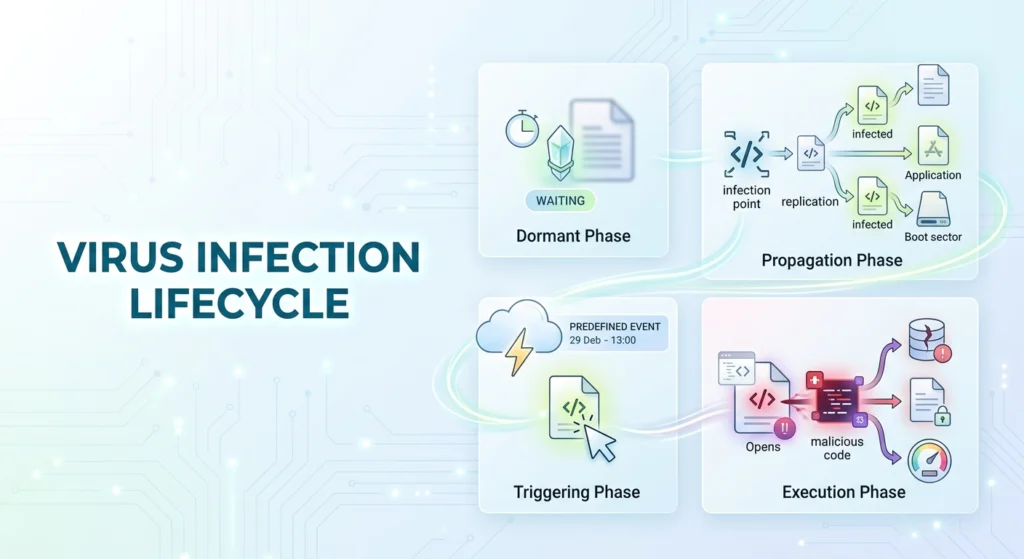
The computer virus lifecycle can be divided into four phases: Dormant, Propagation, Triggering, and Execution. A virus may move through these phases differently depending on its design and infection method.
- Dormant phase: The virus remains inactive or hidden on the system while waiting for a specific condition. It may avoid noticeable activity during this stage.
- Propagation phase: The virus replicates by copying its code into other suitable files, programs, documents, or system areas. This allows additional hosts to become infected.
- Triggering phase: A predefined event activates the virus. This could be opening an infected file, launching an application, reaching a specific date, or another system event.
- Execution phase: The virus executes its malicious code and delivers its payload, which may corrupt files, modify settings, steal information, or disrupt system functions.
This four-phase lifecycle explains what is a computer virus and how does it work at a basic technical level. Not every virus behaves identically, and some may remain dormant or skip certain stages depending on their design.
Virus Evasion and Detection
Some viruses use anti-detection techniques to conceal their activity. A stealth virus can interfere with detection attempts, while a polymorphic virus changes parts of its code between infections. Encrypted viruses can use a decryption routine to conceal malicious code until execution.
Modern antivirus software can use virus signatures, heuristic analysis, and sandboxing to identify suspicious code and behavior. These techniques help detect malware that may not match a known signature.
How Do Computer Viruses Spread?
How do computer viruses spread? Computer viruses spread through infected files, software downloads, email attachments, removable drives, file-sharing networks, and exploited vulnerabilities. The infection normally requires the malicious code to reach and execute on another suitable host.
These methods form common computer virus attack vectors and can overlap with broader malware delivery techniques such as phishing.
Infected Files and Downloads
Infected files can spread a virus when a user executes the compromised program. Common executable extensions include .exe, .com, .bat, and .cmd. Document files such as .doc, .xls, and .ppt have historically been used by macro-based malware.
Downloading software from untrusted sources can introduce a virus on a computer, particularly when users install pirated software, fake updates, or modified applications.
Email Attachments and Phishing
Malicious email attachments can spread malware when recipients open or execute them. Macro virus document macros were a major historical example, while modern attacks can use documents, archives, scripts, links, and other content.
Proofpoint’s 2024 State of the Phish research reported that 71% of surveyed users had taken at least one risky action, showing the role of human behavior in email-based attacks.
Phishing can make malicious attachments and links appear legitimate. Users should treat unexpected email attachments and unfamiliar links with caution.
USB Drives and Removable Media
Removable drives can spread viruses when infected files move between computers. USB drives and shared folders can become infection vectors when users execute infected programs or open compromised documents.
Messaging Apps
Messaging apps can also be used to distribute malicious links, attachments, and infected files. Attackers may send content through platforms such as WhatsApp, Facebook Messenger, or other messaging services and use social engineering to persuade recipients to open it.
Malvertizing and Malicious Ads
Malvertiing, or malicious advertising, uses compromised or fraudulent online advertisements to redirect users to malicious websites or deliver harmful content. Even legitimate websites can sometimes display malicious ads through compromised advertising networks, making suspicious advertisements another potential malware delivery vector.
Vulnerabilities and Exploits
Exploits spread malicious code by taking advantage of software vulnerabilities. A zero-day exploit targets a vulnerability before an effective patch is available or widely deployed.
CISA recommends prioritizing remediation of known exploited vulnerabilities as part of organizational cybersecurity defense.
Internet Downloads
Internet downloads can introduce viruses when files or software come from compromised or untrusted sources. Pirated software, fake updates, cracked applications, and unknown downloads can contain malicious code.
File-Sharing Networks
File-sharing networks can spread viruses when users download and execute infected files. The risk increases when the source and file integrity cannot be verified.
How Can You Get Rid of a Computer Virus?
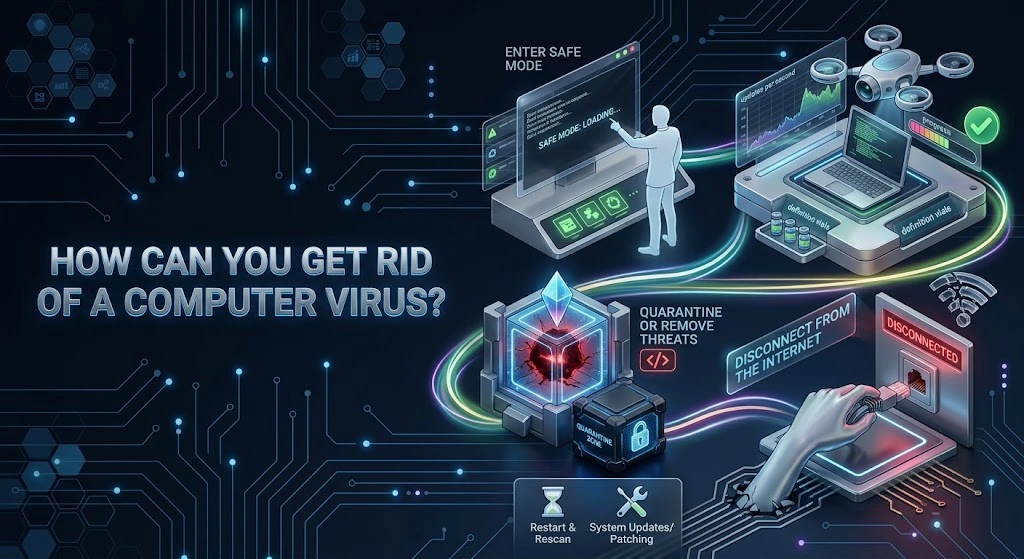
If you suspect a computer virus, take a structured approach rather than simply deleting the suspicious file. The following steps can help contain and remove the infection:
- Disconnect from the internet: Turn off Wi-Fi or unplug the Ethernet connection to reduce the risk of further communication, data theft, or spread to other systems.
- Enter Safe Mode: Restart the computer in Safe Mode with networking disabled when possible. This limits the number of processes running and can make malicious software easier to identify and remove.
- Run a trusted antivirus scan: Update the antivirus definitions if the system can be safely connected to a trusted network, then perform a full system scan.
- Quarantine or remove detected threats: Review the antivirus results and use its quarantine function for confirmed or suspicious malicious files rather than manually deleting important system files.
- Restart and scan again: Reboot the computer normally and perform another scan to check whether the infection remains.
- Patch the system: Update the operating system, browser, applications, and security software to close vulnerabilities that could allow reinfection.
- Escalate serious infections: If the malware persists, sensitive accounts may have been compromised, or the computer belongs to an organization, contact an IT or cybersecurity professional rather than continuing to use the affected device.
This process is particularly important when an infection causes repeated crashes, disables security software, or continues returning after removal. Fortinet similarly recommends isolation, Safe Mode, scanning, quarantine/removal, and system updates as part of malware response.
How Common Is Malware?
The scale of modern malware helps explain why antivirus software and regular security updates are important. AV-TEST reports that it registers more than 450,000 new malicious programs and potentially unwanted applications every day.
AV-TEST also reported that the number of malware samples registered for Windows in its AV-ATLAS database increased from about 920 million to 995 million between 2024 and 2025, with the total expected to surpass one billion in 2026.
These figures represent malware samples tracked by a security research database, not necessarily unique active attacks. They nevertheless illustrate the enormous scale and continual growth of the malware ecosystem.
What Are the Different Types of Computer Viruses?
There are 14 types of computer viruses covered in this guide, including file infector, macro, boot sector, multipartite, polymorphic, resident, overwrite, direct action, web scripting, browser hijacker, network, companion, stealth, and spacefiller viruses.
These categories describe different infection methods, targets, and behaviors. Some terms are used broadly in cybersecurity discussions and can overlap with other malware classifications.
- File Infector Virus
A File Infector Virus attaches malicious code to executable files. The virus can execute when the infected program runs and may infect other executable files.
- Macro Virus
A Macro Virus uses malicious macros inside applications that support document macros. Microsoft Word and Excel documents have historically been common hosts for macro-based infections.
- Boot Sector Virus
A Boot Sector Virus infects the boot sector or related startup information on storage media. The malicious code can execute during the startup process.
- Multipartite Virus
A Multipartite Virus uses multiple infection methods, commonly targeting system startup areas and files. This dual infection can leave more than one infected location on a computer.
- Polymorphic Virus
A Polymorphic Virus changes its code or detectable appearance while retaining its malicious behavior. Polymorphic code evasion tactics can make static signature detection harder.
- Resident Virus
A Resident Virus loads into system memory and remains active while the computer operates. Resident virus memory persistence allows the malware to monitor or affect files and processes after the original infected program has closed.
- Overwrite Virus
An Overwrite Virus replaces part or all of a file’s contents with malicious code. Overwriting virus data destruction can make the original file unusable.
- Direct Action Virus
A Direct Action Virus executes, infects selected files, and then stops rather than remaining permanently active in memory. The virus can search for additional targets each time the infected host executes.
- Web Scripting Virus
A Web Scripting Virus uses malicious scripts delivered through websites or web content to affect a browser or connected system. Web scripting virus browser exploits can target weaknesses in web applications or outdated browser environments.
- Browser Hijacker
A Browser Hijacker changes browser behavior without the user’s intended permission. Common changes include homepage replacement, search redirection, unwanted extensions, and unexpected advertising.
- Network Virus
A Network Virus uses network connections or vulnerable network services to reach other systems. The term is sometimes used broadly, while self-propagating network malware is more precisely classified as a worm.
- Companion Virus
A Companion Virus creates a malicious file that can be executed instead of a legitimate program. Companion virus filename spoofing can exploit how an operating system searches for executable files.
- Stealth Virus
A Stealth Virus uses anti-detection techniques to conceal an infection. Stealth virus anti-detection tricks can include intercepting system requests and returning information that makes infected files appear normal.
- Spacefiller (Cavity) Virus
A Spacefiller Virus, or Cavity Virus, places malicious code into unused areas of an existing file. This technique can let the virus add code without producing an obvious increase in file size.
Summary Table of Common Computer Virus Types
| Virus type | Main target | Main characteristic |
| File Infector Virus | Executable files | Infects program files |
| Macro Virus | Documents | Uses document macros |
| Boot Sector Virus | Boot sectors | Executes during startup |
| Multipartite Virus | Multiple targets | Uses two or more infection methods |
| Polymorphic Virus | Files/code | Changes detectable code patterns |
| Resident Virus | System memory | Remains active in memory |
| Overwrite Virus | Existing files | Replaces file contents |
| Direct Action Virus | Files | Acts when the host executes |
| Web Scripting Virus | Web content | Uses malicious scripts |
| Browser Hijacker | Browser | Changes browser behavior |
| Network Virus | Network resources | Uses network paths |
| Companion Virus | Executable names | Uses companion files |
| Stealth Virus | Files/system areas | Attempts to hide infection |
| Spacefiller Virus | File slack space | Uses unused file space |
Which Threats Are Commonly Mistaken for Computer Viruses?
Several malware types are commonly called computer viruses even though their infection mechanisms differ. Malware is the broader category and includes viruses, worms, Trojan Horses, ransomware, spyware, adware, and rootkits.
| Threat | Is It a Virus? | Key Difference |
| Trojan Horse | No | Disguises itself as legitimate software; does not self-replicate by infecting files. |
| Worm | No | Self-propagates between systems without needing a host file. |
| Ransomware | Not necessarily | Encrypts or blocks access to data and demands payment; may use other malware for delivery. |
| Rootkit | No | Designed to maintain privileged access and hide malicious activity. |
| Software Bug | No | An unintentional software defect; it can create vulnerabilities but isn’t malicious code. |
What Is the Difference Between Computer Viruses and Malware?
A computer virus is one type of malware, while malware is the broader category of malicious software. Malware includes viruses, worms, Trojan Horses, ransomware, spyware, adware, and rootkits.
The computer virus vs malware distinction matters because not all malware uses the same infection or replication method.
What Is a Computer Worm?
A computer worm is malware that can reproduce and spread between systems without requiring a host file in the same way as a traditional virus. Worms often use network connections, vulnerable services, or automated propagation methods.
The main difference between a virus and a worm is the propagation mechanism. A virus normally depends on a host, while a worm can self-propagate between systems.
What Do Computer Viruses Do to Your Computer?
Computer viruses can cause five main types of harm: slower performance, file damage, data or account theft, participation in larger campaigns, and ransom or extortion.
Slow Performance and System Instability
A virus can reduce system performance by consuming CPU, memory, storage, or network resources. Heavy background activity can make applications slow and cause system instability.
File Damage and Data Loss
A virus can modify, corrupt, overwrite, or delete files. An overwrite virus can replace legitimate data and make the original content unusable.
Data and Account Theft
Some malware can collect credentials, personal information, and other sensitive data. A virus can work with spyware or information-stealing malware as part of a wider infection.
A successful malware infection can contribute to a data breach when attackers gain access to sensitive information.
Botnets and Larger Cyberattacks
An infected computer can become part of a wider cyberattack. Attackers can use compromised devices to distribute malware, send malicious messages, steal information, or access other systems.
Compromised devices can become part of a botnet, allowing attackers to control multiple infected systems.
Ransomware and Extortion
Ransomware can encrypt data or deny access to systems and demand payment. Affected users should not assume that paying guarantees data recovery.
How Can You Tell if Your Computer Has a Virus?
How to know if your computer has a virus depends on identifying several unusual signs at the same time, including performance changes, unfamiliar applications, changed files, and unexplained network or account activity. A single symptom does not confirm an infection.
- Slow, Noisy, or Unstable System
Check CPU, memory, disk, and network usage when the system suddenly becomes slow or unstable. Compare current activity with normal system behavior.
- Strange Pop-Ups and Apps
Look for unfamiliar applications, extensions, security warnings, and recurring pop-ups. A legitimate antivirus software tool should identify itself clearly and should not demand installation through an unexpected browser alert.
- Changing Files and Settings
Check for unexplained file modifications, missing files, new startup entries, and changed browser settings. These changes can provide evidence of unwanted software.
- Network or Account Activity
Check for unexpected network connections, messages sent from your account, or unfamiliar login activity. These signs can indicate malware or account compromise.
History and Examples of Computer Viruses
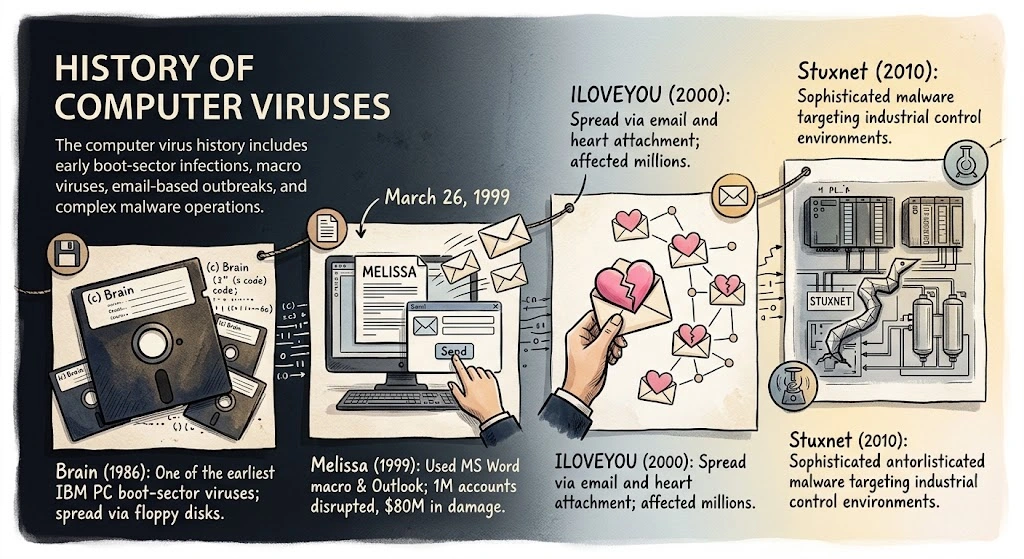
The computer virus history includes early boot-sector infections, macro viruses, email-based outbreaks, and complex malware operations.
- Brain (1986): Brain became one of the earliest widely known IBM PC boot-sector viruses and spread through infected floppy disks.
- Morris (November 1988): The Morris incident demonstrated the impact of self-propagating network malware. It was technically a worm, not a traditional virus.
- Melissa (March 26, 1999): Melissa used a Microsoft Word macro and Outlook email to propagate. The FBI reported about one million disrupted email accounts and estimated damage of approximately $80 million.
- ILOVEYOU (May 4, 2000): ILOVEYOU spread through email and a malicious attachment, affecting millions of computers.
- Stuxnet (discovered in 2010): Stuxnet showed how sophisticated malware could target industrial control environments. It is technically classified as a worm.
Computer Virus Threats in 2025
Computer virus threats in 2025 existed within a wider malware ecosystem that included ransomware, information stealers, Trojans, spyware, worms, and phishing-delivered malware. Traditional computer viruses remain relevant, but many modern attacks use several malware components rather than a single virus.
Email remained a major delivery channel for malicious content. Proofpoint’s Cyber Threat Resources and Proofpoint Platform analyze large volumes of email threats, attachments, URLs, and related indicators.
Modern attacks can combine social engineering, stolen credentials, malicious attachments, compromised websites, and software vulnerabilities. Threat actors can use malware to establish access before deploying another payload.
How Can You Defend Against Computer Viruses?
To prevent computer viruses, keep operating systems and applications updated, use reputable antivirus software, verify downloads, treat unexpected email attachments cautiously, and maintain reliable backups. Good cyber hygiene reduces opportunities for infection.
Computer virus protection can include antivirus software, a firewall, software updates, secure passwords, backups, and safe browsing practices.
Update antivirus detection data regularly. A weekly manual check can help users who do not have automatic updates enabled, while automatic security updates should remain enabled whenever supported.
Disable automatic email image previews when the email environment allows it. Avoid opening unexpected .exe, .com, .bat, .cmd, .doc, .xls, and .ppt files.
Small businesses should maintain patching, backups, account controls, and endpoint protection. Remote workers should secure home networks, update routers, and avoid running unknown files on work devices. Organizations should escalate suspected infections to their IT or security team instead of continuing normal activity on an affected business device.
Frequently Asked Questions
What Is a Computer Virus in Short Answer?
A computer virus is malicious software that attaches to a file or program and can replicate when the infected host is executed.
How Does a PC Get a Virus?
A PC can get a virus by opening infected email attachments, downloading malicious files or software, using infected USB drives, or exploiting security vulnerabilities.
How Do You Get Rid of a Computer Virus?
Use trusted antivirus or anti-malware software to scan and remove the infection. If necessary, disconnect the device from the internet and seek professional IT support.
Who Created the First Computer Virus?
The first known computer virus for IBM PCs was Brain, created in 1986 by Pakistani brothers Basit and Amjad Farooq Alvi.
What Are 5 Examples of Computer Viruses?
Five well-known examples are Brain, Melissa, ILOVEYOU, CIH (Chernobyl), and Stuxnet.
What Is a Trojan in Computers?
A Trojan is malware that disguises itself as legitimate software, content, or a useful file. It relies on execution rather than traditional virus-style host infection.
Can Mobile Devices Get Something Like a Computer Virus?
Yes, mobile devices can be infected with malware. Android and iOS devices can face malicious applications, phishing, spyware, credential theft, malicious websites, and exploited vulnerabilities.
Are Mac and Linux Systems Safe From Viruses?
No, Mac and Linux systems are not completely immune to malware. Their security controls can reduce certain risks, but malicious software and vulnerabilities can still affect these platforms.
Can a Virus Destroy a PC?
Yes. A virus can corrupt or delete files, disrupt system functions, damage data, and in severe cases make a computer unusable.
Can a Computer Virus Damage Hardware Components?
A computer virus normally damages software, files, or system functions rather than physically destroying hardware. Malicious code can cause abnormal hardware use or system behavior, but permanent physical hardware damage is uncommon.
Is a Computer Virus the Same Thing as a Software Bug?
No, a computer virus is malicious code, while a software bug is an error or defect in software. A bug can create a security vulnerability without being malware.
How Do I Check My Computer for Viruses?
Run a scan with reputable antivirus software, check unfamiliar applications and startup items, review unusual account activity, and install current security updates. Virus detection tools can use signatures, heuristic analysis, and behavioral monitoring to identify suspicious activity.
Escalate suspected infections to an IT or security team when the computer belongs to an organization.
How Does a Computer Virus Spread?
A computer virus spreads by infecting a host and using that host to reach another file, program, document, storage device, or system. Common infection methods include downloads, email attachments, removable drives, file sharing, and exploited vulnerabilities.

