


Have you ever opened a website right after it was updated and it won’t open instantly? There is nothing wrong with your internet. It’s most probably a cold cache. Now, to fix that, you need to load the page before a visitor arrives. That is what a warmup cache request actually means.
Somewhere between 20% and 50% of your first-time visitors after a deployment never see your site at full speed. Not because anything’s broken, but because nobody bothered to warm the cache before they showed up.
Not fixing that will not only lose you a user, but it will also kill your metrics.
What is a Warmup Cache Request?
A warmup cache request is a deliberate and controlled HTTP request your system sends before real visitors show up, just to load your website’s content into the cache ahead of time. Saves your visitor’s time, right?
So, a cache is like a small fridge in your kitchen. If it’s stocked, you take what you need in seconds. But if it’s empty, you have to run to the store first, and that takes time. A warmup cache request is you stocking the fridge before anyone gets hungry.
In layman’s terms, instead of waiting for a real user to trigger the first slow load, you send that first request yourself. Your server does the hard work early, quietly, in the background, and by the time real traffic arrives, everything is smooth and fast.
You can also call it cache warming, or simply cache warm-up.
Why is Cache Warming Important?
Let’s suppose you launched a new product, sent out a newsletter, and 1000 people clicked your website within minutes.
If your cache is empty, every single one of those requests forces your server to build the pages from scratch, triggering a full backend fetch. Your server will render data from a database, analyse API Calls, and assemble the final result. That takes time and puts a heavy load on your server.
This sudden-rush scenario is the thundering herd problem, and it’s one of the main reasons why a case warmup request is necessary.
Now, imagine the same scenario but with an already warmed cache a minute earlier; every one of those visitors will see the page instantly from your prepped copy by your server. Meaning no delay and no bouncing off the slow page.
That’s the entire point of request caching combined with the warmup step. You’re not just anticipating cache fills up naturally; you are ensuring it.
Why is it Important for Speed and SEO?
A cold cache doesn’t just annoy visitors; it creates bad Google metrics. Time to First Byte (TTFB) is how long it takes your server to send back the very first piece of a page. Largest Contentful Paint (LCP) measures how long it takes for the main content to become visible. Together with Interaction to Next Paint and Cumulative Layout Shift, these make up what’s known as Core Web Vitals; a set of speed and stability scores that search engines use as part of ranking a page.
A cold cache drags all of these numbers down at once. A warm cache keeps them fast and steady. And there’s a second, less obvious benefit: search engine crawlers like Googlebot are affected by slow response times too. Sites that respond quickly and consistently tend to get crawled more often, which can help more of your pages get indexed. This connection between cache warming and search engine optimization is one of the most overlooked parts of the whole topic.
Cold Cache vs. Warm Cache
These two terms come up constantly, so let’s make them simple.
| Cold Cache | Warm Cache | |
| What it means | Nothing is stored yet | Content is already stored and ready |
| First Visitor Experience | SlowServer builds the page live | FastPage is served instantly |
| Server Load | High, especially during traffic spikes | Low, since most requests skip the backend |
| When it happens | After a deploy, a cache clear, or a restart | After a warmup request has run |
A cold cache isn’t broken. It’s just empty. Every cache starts cold at some point; after a new version of your site goes live, after you clear old cached data, or after a server restarts. The question is whether you let real visitors discover that emptiness, or whether you fill it yourself first.
How a Warmup Request Actually Works
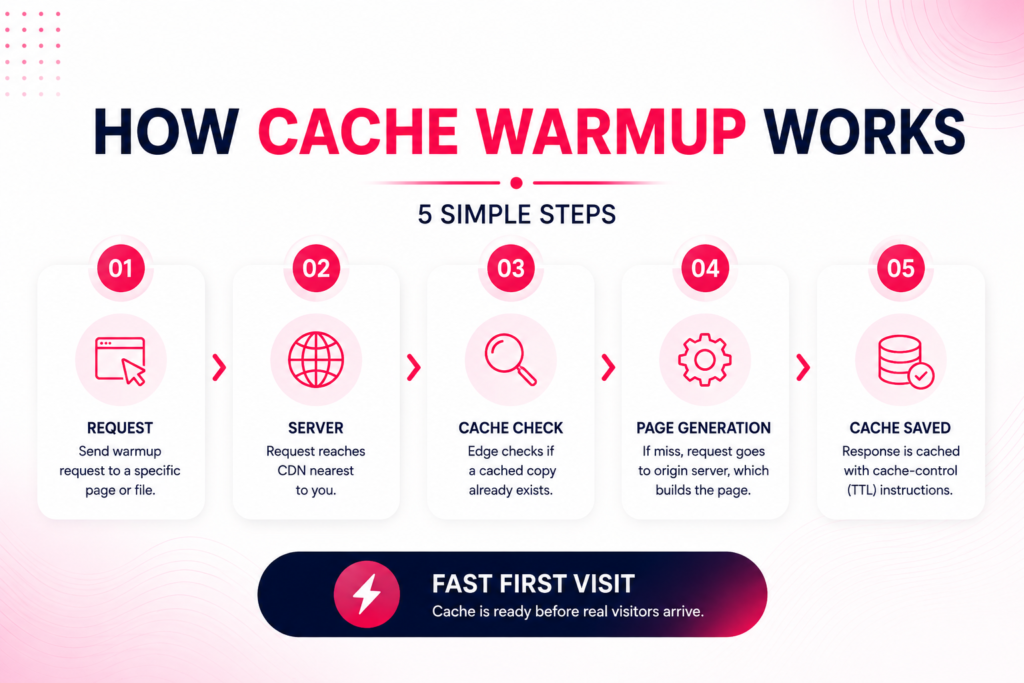
Requesting a cache warmup is not rocket science. It’s simply a way of telling your server to prepare a page before anyone visits it. Here is how it works,
- A request is sent to a specific page or file on your site, the same way a browser would request it.
- That request goes to your server, or more often, to your content delivery network (CDN), a network of servers placed in different regions that deliver your content from the location closest to each visitor.
- The edge location nearest that request checks whether it already has a saved copy, based on something called a cache key, essentially the exact address and settings that identify one specific version of a page. If nothing matches, the request goes further, to a reverse proxy and then your origin server, which builds the page and sends it back.
- The response comes with cache-control headers attached, instructions that tell every layer along the way how long to keep the copy before it expires (known as the TTL, or time to live). The CDN saves that copy accordingly.
The trick is that this whole sequence happens before a real visitor ever shows up. You’re deliberately sending that first request yourself, so a stranger never has to be the one who “breaks in” the cache.
Why Does This Involve More Than One Server?
Most modern websites don’t run from a single server. CDN providers such as Cloudflare, Akamai, and Fastly each maintain their own network of edge locations spread across regions, one in the US, one in Europe, one in Asia, and so on. Some of them also use what’s called an anycast network, which automatically routes each visitor to the closest available edge server.
Warming the cache at one edge location doesn’t warm it everywhere. If your warmup request only reaches the server closest to you, visitors on the other side of the world could still hit a cold cache. A solid warmup process needs to reach every region your audience actually visits.
When Does Your Cache Go Cold?
A cache doesn’t stay warm forever. It goes cold in a few common situations:
After a deployment.
New code usually means the old cached version gets wiped out.
After a manual cache clear.
If you update content and clear the cache to remove the old version, the new cache starts empty.
When content expires.
Cached content is only kept until its TTL runs out. Once that timer expires, the next visitor triggers a fresh, slower load.
After a server restart.
This hits serverless platforms especially hard. Services like AWS Lambda, Vercel, and Cloudflare Workers spin function instances down when they’re idle and start fresh ones on demand, a delay known as a cold start. When that happens, any local cache the instance had is gone too, so the function is dealing with two slowdowns at once.
When an in-memory cache restarts.
Tools like Redis and Memcached store frequently used data directly in memory for extremely fast access. Any restart of these systems wipes that memory clean, and the application has to rebuild it from the database all over again.
None of these are mistakes. They’re just part of running a website. The mistake is not having a warmup step ready to follow them.
Basic Ways to Warm a Cache
You don’t need anything fancy to get started. Here are the most common approaches, from simple to more advanced.
- A List of Priority Pages
Pick your most important pages like your homepage, top product pages, or anything people land on right after a launch, and send requests to those pages right after every deployment or cache clear. This can be as simple as a short script that runs automatically once your new code goes live, often triggered through a deployment pipeline or a scheduled cron job.
- Following Your Sitemap
Instead of keeping a manual list, some setups pull pages straight from your sitemap and warm all of them automatically. As you add new pages, they get picked up without extra work.
- Simulating Real Visitors
Simple requests only load the raw HTML of a page. Tools like Puppeteer and Playwright go a step further by running a real, invisible browser that loads a page the way an actual visitor would, executing scripts, loading images, and triggering content that appears after the page loads. This is especially useful for Next.js sites, which rely on features like Incremental Static Regeneration to rebuild pages in the background.
- Scheduled Warmups
For pages that expire on a timer, you can schedule a warmup to run shortly before that TTL runs out. That way, the cache never actually goes empty; it gets refreshed just in time.
Cache Warming vs. Related Techniques
Cache warming isn’t the only pattern that keeps a site fast. A few related ideas often get mixed up with it.
Cache prefetching happens based on what a specific visitor is doing right now. If someone is reading a product page, the site might guess they will check the reviews next and quietly load that in the background while they’re still reading. Cache warming prepares your site in general, ahead of time. Prefetching reacts to one visitor’s likely next move.
Cache aside, also called lazy loading, is the default behavior most sites already have. The application checks the cache first, and if nothing is there, it fetches the data, returns it, and saves a copy for next time. It’s simple, but it means the very first request always pays the slow-loading cost, the exact gap that warmup cache requests are designed to close.
Write-through caching takes a different approach, updating the cache at the same moment data is saved to the database, so the two never fall out of sync.
Quick Checklist for Getting Started
• Warm your most important pages first: homepage, top landing pages, anything tied to a launch
• Run your warmup process automatically after every deployment or cache clear
• Space out your requests so you don’t overload your own server
• Match your warmup URLs exactly to what real visitors load, including query parameters and headers that affect the cache key
• Never warm personal or login-based pages
• Make sure your warmup reaches every CDN region your visitors are in
Conclusion
A warmup cache request may seem like a small technical detail, but it has a major impact on your website’s performance, user experience, and SEO. A cold cache slows down visitors, increases server load, and hurts your search rankings, while a warm cache ensures speed, stability, and smooth scaling during traffic spikes. By proactively warming your cache after deployments, clears, or expirations, you guarantee that every visitor, whether the first or the thousandth, gets a fast and reliable experience. In short, cache warming is not optional; it’s a best practice that protects your site’s performance and strengthens its visibility in search engines.
Frequently Asked Questions
What is a warmup cache request in simple terms?
It’s a request sent on purpose to load a page into your cache before a real visitor does, so the first person to arrive gets a fast experience instead of a slow one.
What’s the difference between cold cache and warm cache?
A cold cache is empty and forces your server to build each page from scratch. A warm cache already has that page ready to go, so it loads much faster.
Do small websites need cache warming?
Not always. If your site gets steady, low traffic, the cache tends to warm up naturally as visitors browse. Warming matters most when you expect a sudden rush of traffic, like after a launch or a big marketing push.
How often should I run a cache warmup?
Run it right after every deployment and every cache clear. If some pages expire on a timer, schedule a warmup to run just before that TTL runs out.
Can warming the cache slow down my server?
It can, if it’s not rate-limited. Sending too many requests too quickly puts real strain on your server. Space your requests out to avoid this.
Does cache warming actually help with SEO?
Indirectly, yes. Faster TTFB and LCP improve your Core Web Vitals scores, and a consistently fast-responding server tends to get crawled more thoroughly by search engines like Google.

